Had used Dripify before as well, and couldn’t stop vouching for it to my Senior. Dripify is that one tool which can make your Outbound Prospecting seamless. Excellent features, great UI/UX, and greater Onboarding + Support.
I’ve been using Dripify for four months and have found it very effective in building my network at a pace that I could not have imagined and to engage with new connections. The interface is easy to use and building campaigns and sequences is great.
See what LinkedIn can actually deliver with a world-class lead generation tool
Using LinkedIn for lead gen is easy to get wrong. With Dripify, you pick the right people, send messages that sound like you, and watch your calendar fill up
“Fantastic software for LinkedIn! Saves us a huge amount of time and we’re super happy with it. It’s a massive time saver!”
Kevin Koskella
Founder at Work Hero
“Love at first sight! The automation part hands down. You create a sequence and it’s working wonders for you, while you getting fed marketing leads from the side and work on your ‘babies’”
Arthur Isaksson
Account Manager at Tobii
“Phenomenal tool that saves time and does lead generation on LinkedIn instead of you. The cost is minimal in comparison to the level of business it can generate.”
Christian Vermeulen
Head of Sales at HHS
“Very impressive. I am a big fan of automation and Dripify is exactly what I was looking for. I have experience with other LinkedIn automation software and chrome extensions, but this one is truly superb.”
Andrew Kozic
CEO and Founder at Perfomante
“What I particularly appreciate is Dripify’s intuitive interface that makes automation simple, even for someone who isn’t tech-savvy. The ability to create drip campaigns, automate follow-ups, and track performance in real-time has saved me countless hours”
Christopher Mead
Managing Director at My Support Staff
“Having a great time using Dripify. I tried other LinkedIn automation tools like Linked Helper and Dux-Soup, but this software is just another level. I am on a free trial now, but ready to sign up once it’s over.”
Jennifer Gasenko
Marketing Director at Restream
“Dripify has helped our team with lead generation through LinkedIn tremendously. It makes it simple to use and it is on autopilot. I would highly recommend it to all business owners”
Brian Hartman
Managing Partner at Pharus Global
“I had a campaign up and running before I knew it, and it actually worked as I had intended on the first attempt. I am getting great results with the campaign and already thinking about and seeing opportunities for the next ones”
Dion-Rene Hulsman
Business Strategist at Wholistic Wealth
“Love this software and honestly, I cannot imagine working on LinkedIn without it anymore. I offer LinkedIn sales solutions to my clients and Dripify has become a great helper for me. Customer service is also fantastic.”
Angelina Shalim
Director of Recruiting at GlobalRecruit
“What I particularly appreciate is Dripify’s intuitive interface that makes automation simple, even for someone who isn’t tech-savvy. The ability to create drip campaigns, automate follow-ups, and track performance in real-time has saved me countless hours”
Christopher Mead
Managing Director at My Support Staff
“Having a great time using Dripify. I tried other LinkedIn automation tools like Linked Helper and Dux-Soup, but this software is just another level. I am on a free trial now, but ready to sign up once it’s over.”
Jennifer Gasenko
Marketing Director at Restream
“Dripify has helped our team with lead generation through LinkedIn tremendously. It makes it simple to use and it is on autopilot. I would highly recommend it to all business owners”
Brian Hartman
Managing Partner at Pharus Global
“I had a campaign up and running before I knew it, and it actually worked as I had intended on the first attempt. I am getting great results with the campaign and already thinking about and seeing opportunities for the next ones”
Dion-Rene Hulsman
Business Strategist at Wholistic Wealth
“Love this software and honestly, I cannot imagine working on LinkedIn without it anymore. I offer LinkedIn sales solutions to my clients and Dripify has become a great helper for me. Customer service is also fantastic.”
Angelina Shalim
Director of Recruiting at GlobalRecruit
Start generating leads the smarter way
Kick off your lead generation with Dripify and see your first results in under 48 hours – all during your free trial
Dripify sets its own daily limits to keep your LinkedIn activity in a safer range. By default, you can send:
Up to 75 connection requests per day
Up to 100 messages per day with a Basic LinkedIn account
Up to 150 messages per day with LinkedIn Premium Career or Business
There’s another limit to watch, though: LinkedIn also caps how many connection invitations you can send per week, and that number isn’t the same for everyone.
Standard free LinkedIn accounts usually get around 100 invites a week, while Sales Navigator accounts get closer to 200. Your Social Selling Index can affect the limit too, but far less than your subscription does.
Because of that, don’t treat 75 a day as a guaranteed allowance; your real limit can be lower depending on your account age, existing connections, pending invitations, and recent activity.
Treat these numbers as the upper boundary, not the target, and keep your activity in a reasonable range.
LinkedIn caps how many connection requests you can send in a week, usually somewhere around 100 to 200, though LinkedIn doesn’t publish an exact number.
And it doesn’t matter how you send them: manually, through Dripify, or any other LinkedIn lead generation tool. It’s all coming from the same account, so it all counts toward the same limit.
A few things commonly trigger a restriction:
Too many invitations sent manually from your LinkedIn account in the past 7 days
Another automation tool sending invitations from the same account in the past 7 days
Reaching LinkedIn’s 30,000-connection limit: once your network is full, you won’t be able to send any more connection requests
That’s why you should monitor your pending invitations and keep the total below 500. Once they start piling up, it’s worth going through the older ones and withdrawing them yourself.
When you hit the weekly limit, Dripify displays a critical banner letting you know that connection requests can’t be sent until LinkedIn resets your allowance. Your other Dripify actions can still keep running in the meantime, so the restriction doesn’t put the rest of your account activity on hold.
Dripify now sends InMails through Sales Navigator rather than the old Basic LinkedIn InMail action. You’ll need an active Sales Navigator contract connected to your Dripify account to use it.
Once your Sales Navigator account is connected in Dripify, create a new campaign and add Sales Navigator InMail as one of your sequence steps. This lets you message LinkedIn members outside your network, including people who don’t have Open Profiles, so your LinkedIn B2B lead generation isn’t limited to existing connections.
These credits come from LinkedIn, not Dripify. Sales Navigator accounts get 50 new ones a month, renewed on the last day of the month.
A few things affect how far they stretch:
Messaging an Open Profile doesn’t use a credit; only InMails to non-Open Profiles do
If the recipient replies within 90 days, you get the credit back
Unused credits roll over, up to a balance of 150
There are two things worth knowing before you build a sequence around InMail, though.
First, Dripify doesn’t track replies to Sales Navigator InMails yet; those conversations happen in your Sales Navigator inbox, not standard LinkedIn messaging, so they won’t show up in Dripify.
Second, Dripify automatically ends a sequence after an InMail step, so you can’t currently continue outreach past it.
Both of those are things we’re actively working on: reply tracking, step-level analytics, and the ability to keep a sequence going after InMail are all in development.
Yes, Dripify works with free, Premium, Sales Navigator, Recruiter Lite, and Business LinkedIn subscriptions as long as they’re tied to a personal LinkedIn account.
The Sales Navigator subscription gives you the most options to work with on Dripify. You get better search filters, can build larger lead lists, and have access to Sales Navigator InMail for people outside your network.
You can absolutely use Dripify with a free LinkedIn account too. Just remember that LinkedIn puts tighter limits on free accounts, including how many connection requests you can personalize with a note each month. Once you’ve used those up, invitations can still go out, just without the note. Messaging limits are lower as well.
From what we’re hearing now, Recruiter and Recruiter Lite support is a frequent request. If that’s what you’re using, check with Dripify support for the latest status before setting everything up.
Yes, it’s a good habit to clear out old connection requests instead of letting them pile up, especially if you’re regularly reaching out to new people.
A large number of unanswered invites can become a problem over time, so a good rule of thumb is to keep your pending invitations below 500.
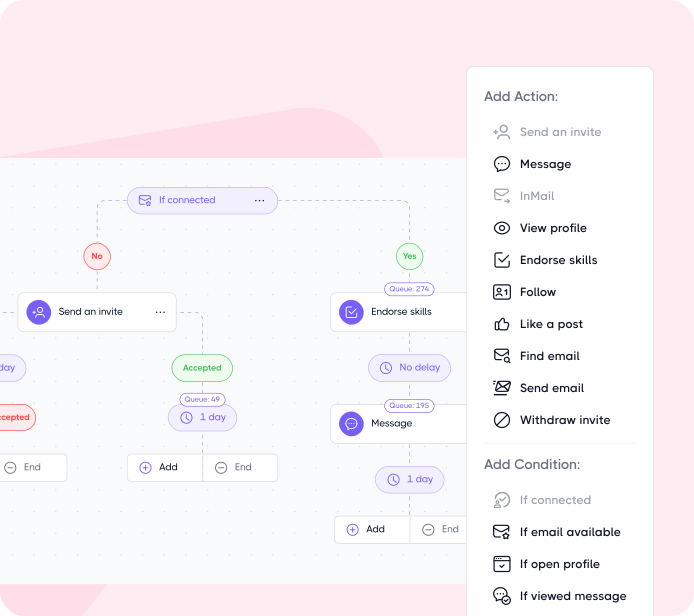
You don’t have to go through them one by one, either. Dripify lets you bulk-withdraw pending requests in a few clicks. You can also add a Withdraw action to your sequence and have unanswered invitations removed automatically after a delay you choose.
The person won’t get a notification when you withdraw the request, and withdrawing it won’t hurt your LinkedIn account.
Yes, all of them.
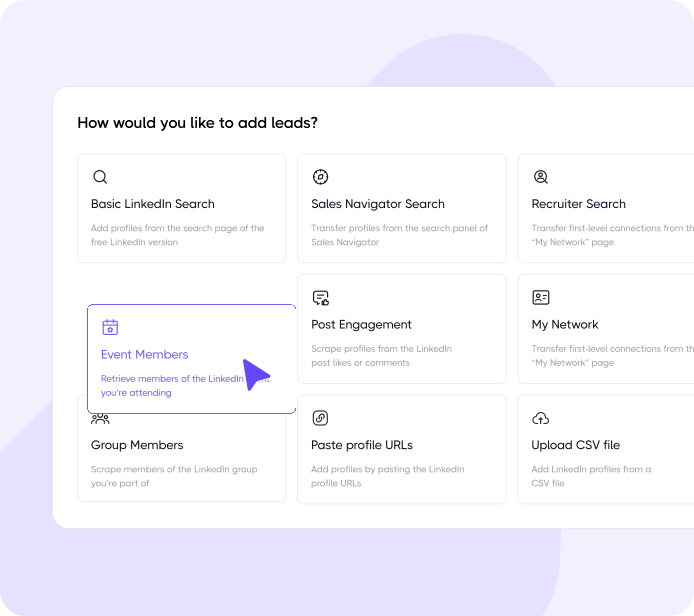
You can add leads from a LinkedIn or Sales Navigator search URL, pull in people who liked or commented on a public LinkedIn post, target members of groups you belong to, or add your own followers. If you’ve already built a list elsewhere, upload it as a CSV and map your custom fields to the right fields in Dripify.
There’s also Evergreen Lead Upload, which lets you automate your LinkedIn lead generation instead of importing the same source over and over. As new people match your search or engage with the post you’re using, the list keeps topping itself up automatically.
Once an import is done, Dripify gives you a Lead Collection Report showing how many leads were added or skipped and why. That includes duplicates, such as a lead who’s already being worked by someone else on your team.
Step 1/2
Suggest an integration
Tell us the name of the software you wish to connect with Dripify and explain how exactly you intend to utilize this integration
Suggest an integration
Please fill the following fields to continue
Thanks a ton for suggesting your integration as the next one for us
We love that you took the initiative! We'll check it out and let you know the possibility to implement it in short term. Stay tuned for an update from us!
A/B test your message
Sign up here to be first in line when our exciting new feature rolls out
You’re on the list - stay tuned!
Awesome! Thanks for joining the waitlist! We'll reach out with an exclusive email when it's ready to launch. It might take a bit, but we promise to bring the news straight to you
Free 7-day trial. No credit card required. Cancel anytime
Select topics
Step 1/5
Thanks a ton for requesting your custom masterclass!
Ready to dive in? We hear you loud and clear! Just give our sales team a tiny bit of time to personalize your quote, and we'll be in touch within 24 hours.