Choose Dripify: if you want to build sequences with if/then branching, edit running campaigns, manage multiple team members, and have account-safety limits applied automatically.
Choose Waalaxy: if you want to start from pre-built sequence templates, send emails via multiple sender accounts, and run outreach within a small team.
Choosing between Waalaxy and Dripify?
Both tools help speed up LinkedIn prospecting, build outreach sequences from pre-built or custom templates, manage leads, and automate multichannel campaigns through cloud-based tools.
Dripify is a cloud-only sales engagement platform that brings native LinkedIn and email outreach, prospecting, email discovery and verification, analytics, and team management into a single workflow.
Waalaxy is a cloud-based platform designed for users who want a simple automation solution for repetitive prospecting tasks and CRM synchronization, without the complexity of a full sales engagement platform.
Waalaxy vs Dripify: Feature Comparison at a Glance
Platform Type
Cloud-based
Now fully cloud-based, Waalaxy’s Chrome extension was removed in July 2026
Web Access
Mobile Access
Limited/feature-dependent
Direct CRM Integrations
HubSpot CRM
HubSpot, Pipedrive
Additional CRM Connectivity
Connect to thousands of additional CRM and sales apps via Zapier and Make
Via Zapier, Make, or n8n: connect with Salesforce, Zoho CRM, Sellsy, Axonaut, noCRM.io, Brevo
Open API
Webhooks
Unique Local IP
Not publicly stated
Multiple Accounts Management
Team Plans
Agency/Client Workspace Support
Now supports multiple, fully separate teams (e.g., per region, department, or client) instead of a single shared workspace
One Team with multiple seats; members keep separate campaigns, lists, data, and quotas, but not multiple independent team workspaces
Multichannel Outreach
Native LinkedIn + Email outreach on all plans
LinkedIn + Email sequences available, but email sending requires the Business plan
Email Outreach Integration
Native LinkedIn + email sequences
Cold email sequences, automated email follow-ups, and multiple sender accounts are on the Business plan only
Beginner-Friendly Interface
Actively praised among G2, Capterra, and Trustpilot reviewers
CSV file, LinkedIn Search, Sales Navigator Search, Sales Navigator Saved Search, Sales Navigator Lead List, Search in Recruiter Lite, own LinkedIn network, LinkedIn profile, comments to posts, post-reactor import, import reposters, LinkedIn groups, LinkedIn event
Lead Export
CSV export with enriched lead data
CSV prospect export + direct CRM export options
Evergreen Lead Upload from LinkedIn Posts & Sales Navigator
Keeps your lead list growing automatically: new leads from LinkedIn Posts get added every 12 hours, Sales Navigator leads weekly. Max 10,000 leads per list
Auto-import: checks every 12h and continuously adds prospects from Sales Navigator searches/lists, post comments, profile visits & incoming invites
Lead List Management
Lead Collection Report
Auto-generated per import: shows leads added/skipped and why, including cross-team duplicates
Reply, tag, filter & schedule follow-ups from Inbox
Shared Campaigns
Shared campaign templates with admin access to members’ campaigns
Admin control over members’ campaigns
Shared Templates
Templates can now be assigned per-team (e.g., different templates for US vs. Europe teams)
Pre-built sequence models & message templates
Lead Assignment
Team Roles & Permissions
Team Dashboard
Reports Per Team Member
Team Performance Comparison
Centralized Team Scaling Infrastructure
Multiple separate teams with centralized management, roles, analytics & shared workflows
Multi-seat Team with centralized billing, permissions, analytics & account access
Cross-Campaign Stats
Historical Campaign Reporting
Campaign-Specific Reporting
Performance across LinkedIn & Email
Step-Level Analytics
Action-by-action breakdown showing exactly where leads drop off
Tracks prospect progress by sequence step; no per-step performance analytics
Unified Recent Activity Stream
Account-wide Recent Activity feed with completed & failed actions
Activity available through Queue & individual prospect history only
Dedicated IP Address
Unique local-region IP assigned to each LinkedIn account
Not publicly stated
LinkedIn Daily Limits
Manual Daily Limits Adjustment
Working Hours Scheduling
Cooling Down Feature
Randomized Delays
Actions are paced and daily quotas randomized
Activity Control
Automatic quota variation
Adaptive Activity Ramp-Up
Limits increase gradually based on account activity
Automatic quota variation
Waalaxy Overview
Waalaxy positions itself as a beginner-friendly, template-first LinkedIn outreach platform aimed at solo users and small teams who want to launch campaigns quickly from a library of pre-built sequence models rather than building workflows from scratch.
Waalaxy gives you a fairly broad mix of places to pull leads from. You can source prospects through CSV files, LinkedIn Search, your existing LinkedIn network, individual profiles, groups and events, or target people who commented on, reacted to, or republished a post.
For more focused prospecting, it also supports Sales Navigator searches, saved searches, and lead lists, plus Recruiter Lite searches.
Integrations
Waalaxy offers a range of integrations for connecting outreach with the rest of your sales stack. It supports HubSpot, Pipedrive, Zapier, Make, n8n, Google Sheets, Airtable, and also API for custom workflows.
Its MCP-powered AI Connector connects Waalaxy with AI assistants like ChatGPT and Claude, allowing users to interact with Waalaxy data through AI.
Alien Copilot
Alien Copilot is Waalaxy’s optional browser extension for speeding up LinkedIn lead imports. When you run a LinkedIn search, Alien Copilot redirects you to Waalaxy with the import already pre-filled, cutting out the manual step of copying and pasting the search URL.
Lead Filters
Segmentation is one of Waalaxy’s stronger areas.
You can narrow leads by connection status, lead state, tags, job title, company, LinkedIn activity, messages and replies, email and phone availability, CRM sync status, groups, events, and more. Custom tags add another layer, letting you quickly include or exclude specific prospect groups.
What are the Pros of Waalaxy?
Ease of use
MCP
Native CRM integrations
Campaign set-up ease
What are the Cons of Waalaxy?
Lower invitation caps: Just 300/month on Pro and 800/month on higher tiers.
Email requires an upgrade: LinkedIn + email outreach is reserved for Business.
No A/B testing of Message, Send Invite, or Email actions.
Limited sequence control: Campaigns rely on pre-built templates and predefined paths.
Inbox is an add-on: Pay extra to manage LinkedIn conversations in one place.
Regional pricing: Prices vary by region beyond exchange rates (per our testing).
Waalaxy Pricing
(confirmed via direct account testing/per user/month, billed annually)
Add-ons (billed separately, on top of any plan/annual pricing):
Type
Price
Inbox Waalaxy (LinkedIn)
$11/month/user
Extra email credits
From $33/month for 500 credits to $218/month for 20,000 credits
Dripify Overview
Dripify positions itself as an all-in-one LinkedIn sales automation platform with a strong focus on LinkedIn prospecting and email outreach
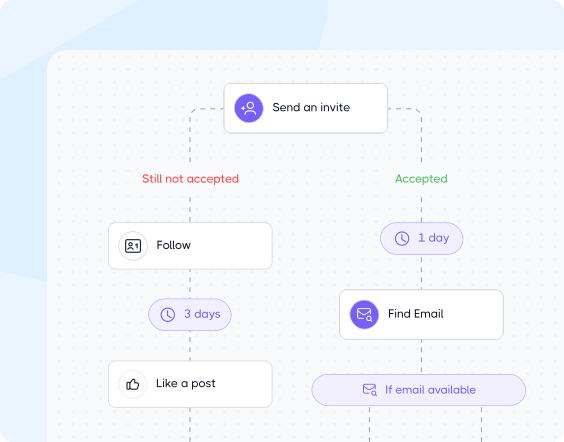
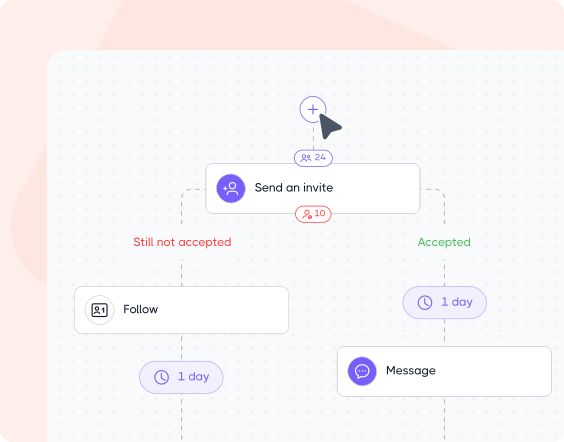
Unlike template-first tools, Dripify gives users a flexible, from-scratch workflow builder with full conditional branching so sequences can be shaped around a team’s actual outreach logic rather than fitted into a fixed model.
Dripify Key Features
Native LinkedIn & Email Outreach
If LinkedIn and email are your primary prospecting channels, Dripify is built with that focus in mind. Its unified multichannel sequences make it easy to nurture leads across both touchpoints without switching between tools.
In this setup, email can serve as the opener, follow-up channel, or final conversion push, while automated LinkedIn workflows adapt the rest based on prospect behavior.
Built-In Email Search & Verification
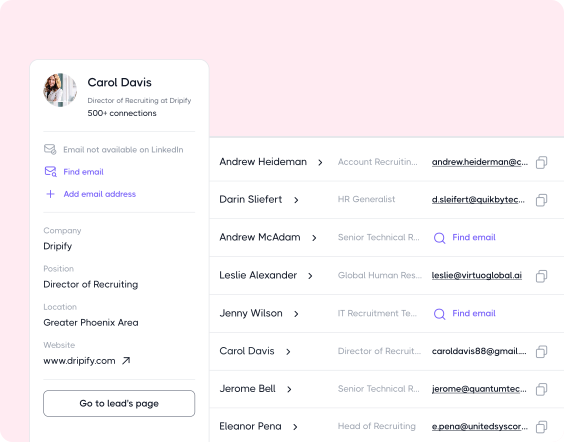
While many LinkedIn automation tools rely on external enrichment platforms, Dripify includes native email discovery and verification directly inside its outreach sequences.
Users can:
Find verified corporate emails beyond LinkedIn
Monitor deliverability
Automate cold email campaigns without leaving the platform
Real-Time Campaign Editing
With Dripify, you can revise active or paused campaigns without rebuilding them from scratch. Add or remove actions, edit copy, adjust delays and settings, extend branches with new follow-ups or conditions, and keep completed or affected leads moving through the updated workflow.
You can also edit already-sent LinkedIn messages and connection request notes from the unified Inbox, making it easy to fix typos, update details, or adjust messaging without switching back to LinkedIn.
Account Safety Infrastructure
One of Dripify’s key differentiators is its built-in account protection system designed to minimize risky automation patterns and maintain more natural LinkedIn activity.
Key safety features:
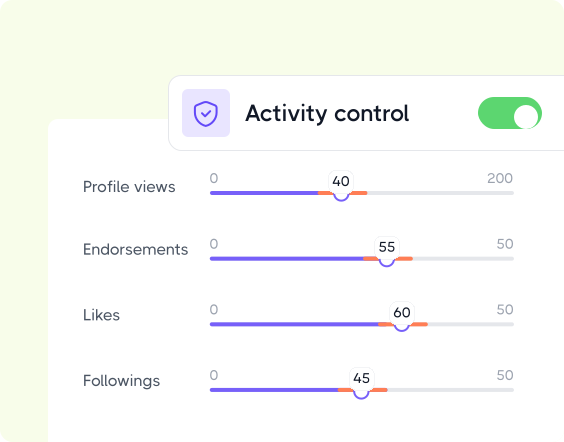
Activity Control –automatically optimizes daily outreach limits around pending invites, activity history, and performance signals.
Unique Local IP – assigns each Dripify account a unique IP address from the user’s local region, helping maintain a consistent location for automated LinkedIn activity.
Human-Like Behavior – spaces automated actions using randomized delays rather than executing them in bursts.
Working Hours – runs actions only during selected time windows for more realistic activity behavior.
Cooling-Down – detects potentially excessive activity and temporarily pauses automation until it’s safer to resume.
Live Campaign & Performance Insights
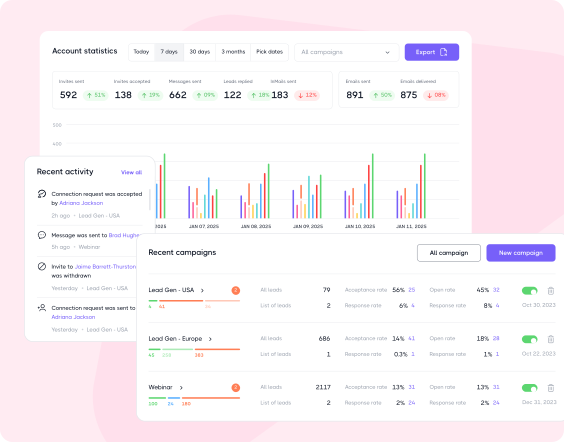
Dripify includes a comprehensive LinkedIn & email analytics environment to give teams complete visibility into outreach performance, prospect engagement, campaign efficiency, and current bottlenecks.
The analytics infrastructure covers:
Step-level sequence analytics
Reply & acceptance rate tracking
Engagement performance monitoring
Campaign-wide performance overviews
What are the Pros of Dripify?
Native LinkedIn & email outreach
Built-in Email Finder & Verifier
Flexible live campaign editing
Sequence branching & behavior-based automation
Team collaboration & agency support
Account safety infrastructure with adaptive scaling
What are the Cons of Dripify?
A/B testing is still in beta
Advanced prospecting still relies on LinkedIn
Dripify Pricing
(per user/month, billed annually)
One Minute Setup
7-Day Free Trial
No Credit Card Required
Basic
$39
per month
Pro
$59
per month
Advanced
$79
per month
Enterprise
custom price
Waalaxy vs Dripify: Head-to-Head Breakdown
Now you’re probably wondering: what actually makes Dripify stand out from Waalaxy where it matters most? Let’s break it down.
Both Dripify and Waalaxy support multichannel outreach, letting you combine LinkedIn and email actions in the same sequence. The difference is when you actually get access to both channels.
With Waalaxy, email sending is reserved for the Business plan only. Lower-tier plans still give you LinkedIn automation and Email Finder credits, but you’ll need to upgrade to Business to add actual email outreach to your campaigns.
Dripify makes multichannel outreach available earlier. LinkedIn and email sequences are included across all plans, and you can also test them during the 7-day free trial. You don’t have to move to the highest subscription tier just to bring email into your outreach.
LinkedIn Conversations
Both Dripify and Waalaxy offer a dedicated LinkedIn Inbox, but they package it differently.
Waalaxy’s Inbox is a separate paid add-on across its plans, with the first 500 conversations available to try for free.
So teams that want to manage LinkedIn conversations inside Waalaxy need to factor that additional cost into their setup.
With Dripify, the Smart Inbox is included with Pro, Advanced, and Enterprise, and you can also use it during the 7-day free trial.
For teams that want outreach and reply management under one subscription, that’s a real advantage; there’s no need to pay separately for the conversation layer.
Live Campaign Editing
Outreach rarely goes exactly to plan, so both platforms give you some room to make changes after launch.
Waalaxy lets you edit message content, delays, and prospects in a running campaign, but the underlying sequence model stays in place.
Dripify goes further with structural live editing. You can add or remove actions, add new steps between existing ones, extend branches with follow-ups or conditions, and even bring completed leads back into newly added steps, all without rebuilding or restarting the campaign.
Dripify also accounts for leads already moving through the workflow. If you remove a step, affected leads can move forward automatically, extend a completed branch, and finished leads can continue through it. Add a new first step, and you decide whether leads still Getting Ready should take the new route.
So while Waalaxy covers useful live campaign adjustments, Dripify gives you more control over the workflow itself after launch, especially when the sequence structure, not just its content or timing, needs to change.
Invitation Volume
The two platforms cap connection requests but apply different limits across pricing tiers.
With Waalaxy, invitation volume is fixed per plan: 300/month on Pro, rising to 800/month on Advanced and Business.
Dripify sets its limits daily rather than monthly: up to 20 connection requests/day on Basic and 75/day on Pro and Advanced. That works out to roughly 2-3x Waalaxy’s monthly ceiling depending on the tiers compared.
For teams running higher-volume outreach, that gives Dripify more headroom within a single subscription.
Step-Level Performance Analytics
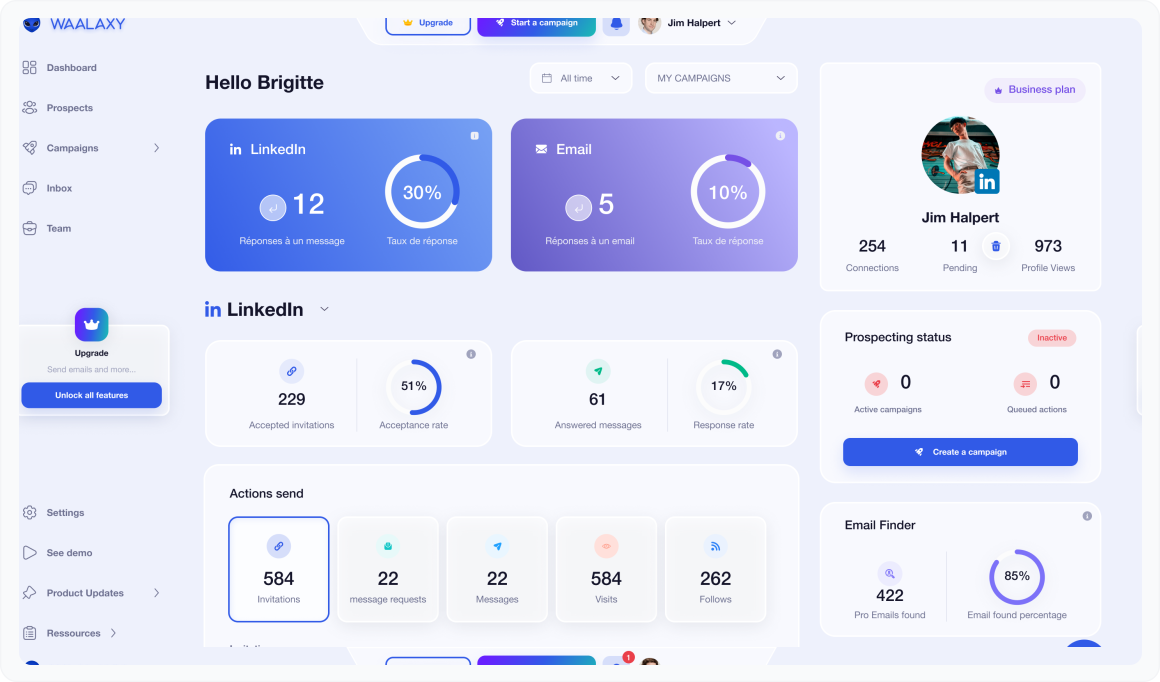
Waalaxy shows where prospects are in a sequence, so you can track who’s waiting, paused, postponed, or finished.
Dripify goes a layer deeper with Step-Level Analytics on Advanced, showing performance directly on individual sequence actions. You can see how a specific connection request, message, or email performs instead of relying only on overall campaign averages. This makes it easier to spot exactly where performance drops off, identify the steps that work best, and fine-tune your sequence based on what’s actually happening.
To understand the difference better, see it like that:
Waalaxy: step-level progress tracking = Where are my leads right now?
It can show that 120 prospects are waiting at Step 2, 40 are postponed, 15 finished, etc.
Dripify: step-level performance analytics = How well did this particular step perform?
It measures the results of an individual connection request, message, or email step while also showing how many prospects are at each stage. This way you can see exactly where performance drops or leads get stuck.
Sequence Architecture
Both platforms let you run multi-step outreach, but how much control you get over the sequence itself is different.
Waalaxy takes a template-first approach. You choose from its library of 37 pre-built campaign sequences, then customize the messages, delays, and other available settings. It’s convenient if you want a ready-made workflow and don’t need to design the sequence logic yourself.
Dripify also offers 18+ pre-built templates for different outreach scenarios and lets teams save and share their own proven sequences. Where it goes further is flexibility: you can also build workflows from scratch, combining LinkedIn and email actions, delays, conditions, and branches around your own outreach logic.
Waalaxy makes it easy to work from a predefined sequence, while Dripify leaves more of the choice to you: use a ready-made template or build yourself around the needs of a specific audience.
LinkedIn Activity Pacing
Waalaxy sends somewhere between 80% and 100% of your set daily limit (a fixed range you can’t adjust). Once you hit LinkedIn’s weekly cap, invitations simply pause until the next week.
Dripify lets you define your own range around a daily target, independent of any other setting: a range of 1 to 10 (default: 3), applied on top of whatever daily limit you set. For example, a limit of 10 with a range of 3 sends between 7 and 13 connection requests a day. This works whether or not Activity Control is enabled.
On the Advanced plan, Activity Control adds a further layer, adjusting the limit itself based on account signals like connection count, pending invitations, and account type.
Cooling Down adds another layer on top, which is pausing automation the moment activity looks risky, independent of any quota, and resuming once it’s safe.
In short: Waalaxy randomizes within a limit you set once; Dripify lets you shape that randomization yourself, adapts the limit to your account’s activity, and adds a safety pause on top.
Out-of-Network Outreach
Both Dripify and Waalaxy can bring Sales Navigator leads into automated outreach, but there’s a difference in what you can do with them once they’re in a sequence.
Waalaxy supports importing prospects from Sales Navigator searches and lead lists, then reaching them through its standard LinkedIn and email actions. However, Sales Navigator InMail isn’t currently documented as a Waalaxy sequence action.
Dripify adds Sales Navigator InMail directly to the sequence builder. If you have an active Sales Navigator subscription and available InMail credits, you can use them to contact prospects outside your 1st-degree network without sending a connection request first.
That gives Dripify another route to prospects who might otherwise be out of reach. Instead of Sales Navigator serving mainly as a source for finding and importing leads, its InMail channel can become part of the automated outreach itself.
Trial Experience (personal, hands-on testing)
Waalaxy advertises “14-day free trial, no credit card required” on its pricing page. That claim is technically true, but only if you know exactly how to get it. The actual signup flow tries hard to steer you somewhere else first.
What actually happens, step by step:
the default option isn’t the free one. Right after connecting LinkedIn, the signup screen pre-selects Billed Yearly (14-day trial, $32/mo, “Save 20%” badge) over the unselected Billed Monthly (7-day trial, $39/mo).
Choosing the highlighted, default option demands a card. Continuing with a 14-day option (yearly) doesn’t start a trial; it opens a full billing form (organization name, address, tax ID/VAT, card number, expiration, CVC).
The order summary shows “$0.00 due” now but also states the trial ends on a set date, after which $384 is charged automatically unless you cancel first.
Trying to back out doesn’t lead to the free option either. Declining triggers a retention modal with two options: “Keep the freemium plan” (the limited permanent tier) or “No, I want my free trial,” which loops you straight back to the same card-entry page.
The real free trial only appears after declining twice. Choosing “Keep the freemium plan” triggers one more screen: “On second thought, it’s on us: Advanced plan, 14 days free.”
Clicking “Let’s go” drops you directly into the full dashboard on a Trial Advanced plan (no card is requested anywhere in this path), complete with the same 25 email finder credits the paid Advanced plan gets, renewing monthly.
Final take: Waalaxy’s “14-day, no card” trial is real, but it isn’t what you get by following the pricing page’s obvious, highlighted path. That path requires a card and silently sets up a $384/year auto-charge. To reach the genuine free version of the same trial, you have to actively decline the card request, then decline a deliberately unattractive Freemium downsell, before Waalaxy finally offers it as a “gift” on the third screen. The easiest true no-card option is simply selecting Monthly billing on the very first screen (7 days, no friction), but if you want the full 14 days for free, be prepared to say “no” twice before Waalaxy lets you have it.
Dripify’s trial is a single, straightforward path. Signing up starts a 7-day trial with full Advanced-plan access, and no credit card is requested at any point. There’s no pre-selected paid option to decline, no billing form to fill out and back out of, and no retention modal offering a downsell before revealing the real trial. When the 7 days end, nothing is charged automatically: you choose a plan to continue, or the account simply goes inactive, and the whole thing can be cancelled anytime from the Billing section. Dripify’s support team also confirms the free trial can be extended by another 7 days upon request.
Scaling LinkedIn Accounts
Waalaxy takes an unusual approach to scaling when there’s no additional team member to add. Inside its Team interface, Waalaxy displays a “No colleague? Rent a LinkedIn account” option that promotes its partner, MirrorProfiles.
The offer includes a Waalaxy-specific 10% discount and accounts advertised with 500+ existing connections and several months of warm-up, ready to be connected to automation.
In other words, Waalaxy gives teams a built-in path to expand outreach with a rented LinkedIn account, rather than another employee’s profile.
That’s worth factoring into a safety comparison. LinkedIn has rules around account authenticity, sharing, and transferring accounts, so businesses considering rented profiles should assess that setup against LinkedIn’s requirements and their own risk tolerance.
Dripify doesn’t promote LinkedIn account rentals as part of its team-management flow. If you want to scale outreach around the accounts of your actual salespeople, recruiters, or client teams, that’s a notable difference between the two platforms.
Regional Pricing (personal, hands-on testing)
Waalaxy’s pricing is not a flat rate translated into local currency; it varies by region in a way that goes beyond simple exchange-rate conversion.
For example, check Waalaxy’s pricing page, say, from the US and Spain, and you’ll see different currencies, prices, and annual discounts. The US quotation comes at -20% off ($16/$32/$55 per user/month for Pro/Advanced/Business, billed annually).
Spain, in contrast, gets a steeper 50% annual discount, bringing the same plans to €19/€49/€69 per month, billed annually.
Even after converting the EUR price to USD at current exchange rates (mid-September 2026, ~1.15 USD per EUR), Spain’s pricing comes out roughly 37-76% higher than the US price, depending on the plan.
Dripify, by contrast, prices consistently in USD regardless of region: $39/$59/$79 per user/month on annual billing across Basic, Pro, and Advanced.
For international teams comparing total cost, that’s a meaningful difference: Dripify’s price is the same wherever you’re buying from, while Waalaxy’s actual cost depends on where in the world the subscription originates.
When Waalaxy Might Be a Better Fit
If you prefer a template-first approach
Waalaxy centers campaign building around ready-made sequences without designing the workflow from scratch.
If you want Inbox as a separate add-on
Waalaxy Inbox can be added separately for LinkedIn conversation management, with tags, filters, saved replies, and scheduled follow-ups.
If you’re running low-complexity outreach
Particularly when audiences change, but the basic outreach motion stays the same, and you want to repeat it without much setup.
Switching from Waalaxy to Dripify
Switching from Waalaxy to Dripify? Start with these simple steps.
01. Export your Waalaxy data
Pull your lead lists, tags, and campaign performance data out of Waalaxy via CSV export before closing or downgrading your account.
02. Import leads into Dripify
Upload your CSV directly into a Dripify campaign, or use LinkedIn Search, Sales Navigator, Recruiter, Events, Groups, Posts, My Network, and profile URLs to add leads the same way.
Once leads exist in the system, you can reuse them: Dripify’s “Add to campaign” feature lets you pull leads from an existing campaign or your Leads tab into a new or different campaign without re-uploading.
03. Rebuild your best-performing sequences
Recreate your top Waalaxy templates inside Dripify’s workflow builder, this time mixing branching logic and email steps where useful.
04. Set your safety parameters
Configure working hours, daily limits, and Activity Control so Dripify can manage ramp-up automatically as you resume outreach.
What Dripify Users Say
I’ve tried other solutions, but Dripify is the king. First, customer support! I had the response on any question in a matter of seconds. Then, the product itself, to be able to do a workflow for your campaign and to push later your contacts to a CRM that’s priceless compared to other products!
Khaled A.
Founder, CEO Financial Services
Excellent sales automation tool. Super easy to use, fast onboarding and intuitive design. The tool works well for what it’s intended, but there’s no denying it’s expensive – especially in light of it having to be using in conjunction with Sales Nav. We have to scalably conduct outbound sales and it’d be quite impossible with the time we have if we didn’t have tools like Dripify to assist us along the way.
Michael Davis
Senior Account Manager Nimbus Engineers
Easy setup and start. The trial was well supported and the team have been great in making sure I was confident in using the platform.
James DB
Dripify vs Waalaxy FAQ
Neither is inherently better.
It depends on whether you want a quick, template-based way to run LinkedIn campaigns (Waalaxy) or an all-in-one platform with native LinkedIn + email, deeper live-editing, and account-specific safety controls (Dripify).
Waalaxy is template-first: you pick one of 37 pre-built sequence models and customize it.
Dripify also provides 18+ pre-built templates and lets you save your own as reusable team templates, but it additionally gives you the freedom to build sequences from scratch using LinkedIn and email actions, conditions, and branches.
You can also restructure those sequences while they’re live, rather than being limited to changing copy or timing.
Waalaxy’s base tiers start lower ($16-$55/month/annual), but email sending and Inbox access are gated to higher tiers or paid add-ons.
Dripify’s plans ($39-$79/month/annual) include native email outreach and Inbox from the start, so the total cost for a comparable feature set can end up closer than the sticker price suggests.
Yes, exporting leads via CSV and rebuilding your top sequences in Dripify’s workflow builder is easy. Dripify also offers 18+ pre-built templates, so teams that prefer to start from a template rather than build from scratch can do that too.
The main adjustment is that Waalaxy’s templates come with fixed, pre-set conditions and branches you can’t modify, while Dripify lets you add, remove, or customize conditions and branches on any sequence, template-based or built from scratch.
Yes, but the no-card path isn’t the default option shown on the pricing page.
Selecting Monthly billing at signup gives a 7-day trial with no card required; the Yearly billing requires a card and starts a paid subscription unless canceled.
However, if you’re persistent enough to decline the annual paid-plan offer a couple of times, Waalaxy eventually unlocks a 14-day free trial of its Advanced plan, with no credit card required.
Both are considered safe when used responsibly.
Dripify adds protection Waalaxy doesn’t offer as standard (an account-specific adaptive ramp-up and an automatic Cooling-Down safeguard), while Waalaxy relies on daily quota variation without account-specific adjustment.
Tell us the name of the software you wish to connect with Dripify and explain how exactly you intend to utilize this integration
Suggest an integration
Please fill the following fields to continue
Thanks a ton for suggesting your integration as the next one for us
We love that you took the initiative! We'll check it out and let you know the possibility to implement it in short term. Stay tuned for an update from us!
A/B test your message
Sign up here to be first in line when our exciting new feature rolls out
You’re on the list - stay tuned!
Awesome! Thanks for joining the waitlist! We'll reach out with an exclusive email when it's ready to launch. It might take a bit, but we promise to bring the news straight to you
Free 7-day trial. No credit card required. Cancel anytime
Select topics
Step 1/5
1235
Thanks a ton for requesting your custom masterclass!
Ready to dive in? We hear you loud and clear! Just give our sales team a tiny bit of time to personalize your quote, and we'll be in touch within 24 hours.







 Waalaxy: step-level progress tracking = Where are my leads right now?