
12 Best SDR Tools to Build Your Outbound Stack in 2026


| Tool | Best For | Starting Price | Role in Your Stack | Biggest Strength | Main Limitation |
|---|---|---|---|---|---|
| Dripify | LinkedIn-led outbound SDR teams | $59/user/mo (annual) | LinkedIn & email outreach | Automated LinkedIn + email outreach, inbox, and CRM sync | Not a full CRM replacement |
| ZoomInfo | B2B teams that need account and contact intelligence | Custom pricing | Prospecting data and account intelligence | Large B2B database with buyer intent signals | Data quality varies by market |
| Cognism | Phone-heavy teams selling into Europe and international markets | Custom pricing (free data sample available) | Contact data & mobile numbers | Phone-verified mobile numbers (Diamond Data) | No outreach or dialing |
| HubSpot Sales Hub | Small and mid-market teams that want CRM and engagement in one place | From $7/seat/mo (annual) | CRM & sales engagement | All-in-one CRM with a strong integration ecosystem | Costs rise with seats |
| Agentforce Sales (Salesforce) | Mid-market and enterprise teams with complex sales processes | Custom | CRM and system of record | CRM + AI agents | Complex to implement and administer |
| Pipedrive | Small and mid-sized teams that want an easy visual CRM | $14/seat/mo (annual) | CRM and pipeline management | Intuitive drag-and-drop pipeline | No built-in calling |
| Dialpad | Phone-heavy SDR and inside sales teams | From $15/mo (annual) | Calling and real-time call coaching | Power dialer with live AI coaching | Reviews mention call quality issues |
| Gong | Mid-market and enterprise teams with structured coaching programs | Custom pricing | Conversation intelligence and coaching | Market-leading call analytics and AI summaries | Insights come mostly after calls, not live |
| Calendly | Teams that want instant meeting booking and lead routing | Free; paid from $10/seat/mo (annual) | Meeting scheduling and routing | Frictionless booking links with routing forms | Round robin, routing, and Salesforce sync require Teams plan or higher |
| Coupler.io | RevOps and sales managers who need automated reporting | Free; paid from $24/mo (annual) | Reporting and analytics | No-code data syncs from 400+ apps into dashboards | Some stack tools (Dripify, Dialpad, Cognism) lack native connectors |
| Octopus CRM | Solo reps and small teams on a tight budget | $6.99/mo (annual) | Basic LinkedIn automation | Very low price for LinkedIn automation | Not cloud-based like Dripify |
| GoTo Meeting | Teams that need simple, affordable video meetings and demos | $12/organizer /mo (annual) | Meetings and demos | Great quality of calls and meetings | AI summaries need the Business plan |
Searching for the one perfect SDR tool?
Unfortunately, it doesn’t exist. Each tool should cover a specific gap in your process.
Contents:
That’s why we’ve curated 12 best SDR tools by the role they play in an outbound workflow. From there, build a stack that fixes most of your bottlenecks.
Quick Picks: Best SDR Tools for 2026
*Note: Prices shown are for annual plans and reflect information available in September 2026. Plans and pricing may have changed since then, so double-check current details before choosing an SDR tool.
Once again: these 12 tools don’t do the same job. Together, they form a stack map, with each tool covering one of the following SDR tasks:
- Finding the right contacts
- Reaching prospects on various channels
- Booking meetings
- Keeping every activity visible
- Learning which messages, channels, and reps actually generate pipeline
So instead of asking which tool to buy, ask which part of your outbound workflow is slowing your reps down right now.
Then use the picks below to find the tool, or combination of tools, that fixes that bug.
How We Selected the Best SDR Tools 2026
To build this list, we evaluated each tool against four criteria:
- Workflow importance: Does it address a problem SDRs face every day?
- Time saved: Does it automate repetitive tasks such as list building, LinkedIn outreach, follow-ups, scheduling, CRM updates, or reporting?
- Stack fit: Does it integrate with the other tools in your outbound process?
- Customer feedback: Where public reviews exist, we looked for patterns in what users like, what frustrates them, and which features they rely on most.
Pro tip! Give reviews extra weight. A vendor’s website lists what the tool can do, but users tell you which features actually matter in daily work.
Best SDR Tools 2026 To Add To Your Sales Stack
Dripify | Best First Outreach Layer for LinkedIn-Led SDR Teams

Dripify is a LinkedIn and email outreach automation tool for SDRs, founders, recruiters, agencies, and sales teams that use LinkedIn as a major outbound channel.
It helps teams bring leads into campaigns from sources such as LinkedIn Search, Sales Navigator, Recruiter, Events, Groups, LinkedIn Posts, My Network, CSV uploads, and individual profile URLs.
From there, SDRs can move those leads into automated sequences that combine LinkedIn + email actions, plus email search and validation in one flow.
Best for:
Sales teams that use LinkedIn heavily and want to automate repetitive prospecting and follow-up steps while keeping their CRM connected to outreach activity.
 Best for:
Key SDR Features
- Native LinkedIn and email outreach: Build sequences that combine LinkedIn actions and email steps in one workflow.
- Built-in Email Finder and verification: Find and verify corporate emails without leaving the campaign workflow.
- Flexible sequence builder: Use delays, conditions, and branching to create behavior-based outreach flows.
- Live campaign editing: Adjust active or paused campaigns without rebuilding them from scratch.
- Smart Inbox: Manage LinkedIn and email conversations in one place without constantly switching back to LinkedIn.
- A/B testing: Test message, invite, and email variants to reach your target audience the best way.
- Campaign and step-level analytics: Track campaign performance, acceptance rates, replies, failed actions, and step-level drop-off.
- LinkedIn activity controls: Use working hours, randomized delays, activity limits, cooling-down logic, and adaptive ramp-up to reduce risky automation patterns.
- Team management features: Manage users, roles, shared templates, team reporting, and campaign visibility across reps.
Pros
- Strong fit for LinkedIn-led outbound teams that want outreach, reply management, and reporting in one workflow
- LinkedIn activity controls support more cautious automation behavior
- Team features make it useful for agencies and multi-rep SDR teams
Cons
- Not a full CRM replacement
- Not enough for phone-first SDR teams
- A/B testing is still in beta
Customer feedback
For this curation, we reviewed public Dripify customer feedback in late September 2026.
Dripify holds strong ratings across all three platforms: 4.6/5 on Trustpilot (527 reviews), 4.5/5 on G2 (353 reviews), and 4.7/5 on Capterra (roughly 477 reviews). Trustpilot also shows 255 reviews from the past 12 months. Capterra’s review count varies slightly between pages.
Users tend to like Dripify for the practical stuff: quick setup, less repetitive LinkedIn work, easier campaign management, and follow-ups that take less manual effort. Time savings come up often, too.
Pricing
Dripify offers a 7-day free trial of its Advanced plan with no credit card required. If you need more time to evaluate the platform, you can request a trial extension from the support team.
With annual billing, plans start at $59/user/month for Pro and $79/user/month for Advanced.

ZoomInfo | Best for B2B Sales Intelligence

ZoomInfo is a go-to-market intelligence platform that helps B2B sales teams identify accounts, find decision-makers, prioritize outreach with buying signals, and enrich CRM records.
In the context of this SDR stack, ZoomInfo’s main role is the prospecting data and account intelligence layer. It helps teams answer who to contact, which companies fit the ICP, which contacts belong in the buying committee, and which accounts may be worth prioritizing before outreach begins.
Best for:
B2B sales teams that need account and contact intelligence before launching outbound campaigns.
Key SDR Features
- Contact and company search: Find professional profiles, company data, direct dials, business emails, and social profile links.
- Buyer intent data: Identify contacts showing buying signals related to relevant topics, categories, or keywords.
- Workflows and signal-based actions: Use market signals, buyer intent, and technology-installation data to trigger sales activity.
Pros
- Strong fit for B2B teams that need account and contact intelligence before outreach
- CRM enrichment helps reduce manual record cleanup and missing contact or company fields
- API and integrations make it more suitable for RevOps-managed sales stacks
Cons
- Pricing is not published as a simple self-serve monthly/annual plan
- Data quality should be tested against your specific market, geography, and ICP before committing
Customer feedback
At the time of review (late September, 2026), positive reviews within Trustpilot, Capterra, and G2 most often praise ZoomInfo for its large B2B database, contact and company search, prospecting filters, buyer/account insights, and CRM enrichment value.
Negative reviews most often mention data-accuracy issues, pricing or contract concerns, support frustrations, and fit challenges for smaller teams.
Pricing
ZoomInfo uses custom pricing rather than publishing fixed monthly or annual rates.

ZoomInfo also offers a free trial by request, but the full terms are not clearly published.

Publicly indexed ZoomInfo trial information indicates the trial is typically 7 days, while public user feedback suggests the actual length, access level, and usage limits may vary by sales process, package, and approval.
Cognism | Best for Verified B2B Contact Data and Mobile Numbers

Cognism is a B2B sales intelligence platform that helps SDR teams find companies, decision-makers, business emails, phone numbers, and verified mobile numbers for outbound prospecting.
In the context of this SDR stack, Cognism’s main role is the contact data and mobile-number layer. It is especially relevant for teams that rely on phone outreach, sell into Europe, or international markets, and need a data source before launching LinkedIn, email, or calling campaigns.
Best for:
B2B SDR teams that need accurate contact data, verified mobile numbers, and compliant prospecting data before outreach.
Key SDR Features
- Phone-verified mobile numbers: Cognism’s Diamond Data focuses on phone-verified contacts.
- LinkedIn and web prospecting: Use Cognism’s browser extension over LinkedIn and websites to identify contacts and push data into sales workflows.
- Buying signals and account intelligence: Surface company context, signals, and targeting intelligence so reps know who to contact, when to engage, and what to say.
Pros
- Strong fit for phone-heavy SDR teams that need verified mobile numbers
- Helps reduce manual contact research and list-building work
Cons
- Not a full CRM, dialer, or sales engagement platform
- Data quality should be tested in your target market, industry, and region before committing
Customer feedback
Cognism gets a positive mark for mobile-number quality, ease of prospecting, European data coverage, the browser extension, time savings, and contact-data reliability.
Negative reviews most often mention pricing, export limits, occasional missing or outdated data, regional coverage gaps, and privacy or compliance concerns from people whose data appears in the database.
Pricing
All pricing for Cognism’s sales prospecting, CRM enrichment, and data-as-a-service solutions is custom and requires contacting sales.
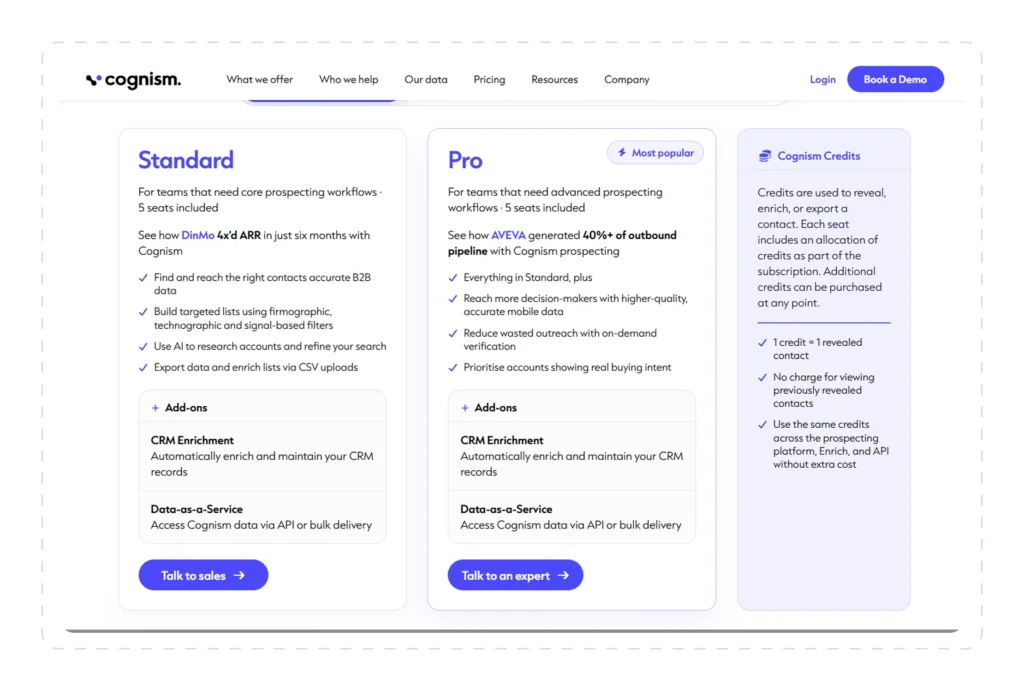
Instead of a standard free trial, Cognism promotes a free data sample. Users submit their business details and ICP, and Cognism says it aims to return a sample enriched with verified mobile numbers and emails within 72 hours.

HubSpot Sales Hub | Best All-in-One CRM & Sales Engagement Platform

HubSpot Sales Hub is a sales CRM and engagement platform that helps SDR and sales teams manage leads, deals, sequences, meetings, calling, and reporting from one connected system.
HubSpot serves as the CRM and sales engagement layer in this particular curation.
Best for:
Small and mid-market sales teams that want CRM, prospecting, sales engagement, scheduling, and reporting in one platform.
Key SDR Features
- CRM contact, deal, and task management: Store contacts, companies, deals, tasks, sales activity, and pipeline records in one CRM.
- Lead management: Manage leads from the leads index page or sales workspace, create filtered lead views, and organize prospecting efforts.
- Sales workspace: Review tasks, sequence activity, and guided actions from one sales workspace designed to help reps focus on high-impact sales actions.
Pros
- Free CRM and free sales tools are available with no credit card required
- A strong integration ecosystem makes it useful as the center of a sales stack
Cons
- Costs can rise as teams add seats
- Specialized LinkedIn outreach, advanced prospecting data, or phone-heavy workflows may still require tools like Dripify, ZoomInfo, Cognism, or Dialpad
Customer feedback
G2 showed a much stronger profile for HubSpot Sales Hub, with public pricing/review pages showing a 4.4 out of 5 rating.
Capterra’s HubSpot Sales Hub page also shows generally positive review snippets, with users praising ease of use, integrations, lead and customer tracking, automation, reporting, and the value of HubSpot as a record of truth for sales activity.
Pricing
HubSpot Sales Hub’s free plan supports up to 2 users at no cost, and you don’t need a credit card to sign up.

When billed annually, Starter costs $7 per seat per month, while Professional costs $90. Enterprise is priced at $150 per seat per month.
Agentforce Sales (Salesforce Sales Cloud) | Best for Complex Enterprise Sales Operations

Agentforce Sales (formerly Sales Cloud) is Salesforce’s AI-powered sales CRM for managing leads, accounts, contacts, opportunities, pipeline, forecasting, sales activities, automation, and reporting.
Best for:
Mid-market and enterprise sales organizations that need a highly configurable CRM for complex sales processes, permissions, reporting, forecasting, AI-assisted workflows, and integrations.
Key SDR Features
- AI SDR agent: Engages prospects, handles objections, and books meetings 24/7.
- Sales Coach: Runs personalized pitch and objection practice.
- CRM-grounded AI: Uses Salesforce and external data to guide actions.
Pros
- Strong fit for complex teams needing CRM-backed AI workflows
- Broad AppExchange ecosystem works well for RevOps stacks
- Best suited to established Salesforce teams with mature processes
Cons
- Overkill for small teams with basic CRM needs
- Still needs separate tools for outreach, data, calling, coaching, and scheduling
Customer feedback
Users praise the automation, reporting, customization, integrations, and pipeline visibility. Common complaints center on cost, complexity, setup and admin work, support, and suitability for smaller teams.
Pricing
Agentforce uses three pricing models:
- Salesforce Foundations: Free for Enterprise Edition customers and above
- Flex Credits: $500 per 100,000 credits, based on usage
- Conversations: Custom, pay-per-conversation pricing

Pipedrive | Best Visual Pipeline CRM for Small and Mid-Sized Sales Teams

Pipedrive is a sales-focused CRM that helps SDR and sales teams manage leads, deals, contacts, activities, and follow-ups through a visual, drag-and-drop pipeline.
Best for:
Small and mid-sized sales teams that want an easy-to-adopt CRM built around pipeline visibility and activity-based selling.
Key SDR Features
- Manage leads and deals visually.
- Automate emails, follow-ups, and routine tasks.
- Assign and score leads automatically
Pros
- Explore 400M+ profiles and 10M+ companies through Cognism
- Connect 500+ tools, including Zapier, Zoom, and Lemlist
- Get meeting briefs, transcripts, and suggested CRM updates with Nova
Cons
- No native calling tools
- Automations lack the deeper branching of enterprise CRMs
Customer feedback
Pipedrive scores 4.4/5 on Trustpilot (3,450 reviews), 4.3/5 on G2 (4,981), and 4.5/5 on Capterra (3,061).
Users like its simplicity, visual pipeline, customization, and integrations. Complaints mostly cover limited automation and reporting, extra costs, support, subscription changes, and in-app pop-ups.
Pricing
Paid plans start at $14/seat/month for Lite, followed by Growth at $39, Premium at $59, and Ultimate at $79.
All prices are billed annually.

Dialpad | Best AI-Powered Calling Platform for Phone-Heavy SDR Teams

Dialpad is an AI-powered business communications platform that integrates calling, SMS, video meetings, and a sales dialer. It also includes real-time transcription, call summaries, and live coaching.
Best for:
Outbound SDR and inside sales teams that make a high volume of calls and want AI transcription, live coaching, and automatic CRM logging in one calling tool.
Key SDR Features
- Power dialer (Dialpad Sell): Representatives work through a call list without dialing each number individually.
- AI Live Coach and battle cards: Real-time assist cards and sentiment analysis appear during calls to assist representatives in dealing with objections.
- AI Playbooks: Structured talk tracks with real-time prompts walk representatives through each step of a call.
Pros
- AI-powered transcripts, recaps, and real-time coaching
- CRM activity logged automatically
- Live call listening, rep guidance, and call joining
Cons
- CRM integrations and other key tools require higher tiers
- Call quality and connection problems appear in reviews
Customer feedback
Dialpad sits at 4.0/5 on Trustpilot (3,188 reviews), 4.4/5 on G2 (4,214 reviews), and 4.2/5 on Capterra (roughly 565 reviews). Trustpilot includes 679 reviews from the past year. On Capterra, ease of use scores 4.3, features 4.2, value 4.1, and customer service 4.0.
Reviews often point to Dialpad’s straightforward setup, useful AI call notes and summaries, recording tools, solid call clarity, and having calls, messaging, and meetings together in one place.
Complaints mainly center on call reliability, customer support, billing and cancellations, higher-tier feature limits, and transcription accuracy across accents or non-English calls.
Pricing
Dialpad comes in three plans:
- Standard: $15/month annually, or $27 month-to-month
- Pro: $25/month annually
- Enterprise: Custom pricing, with a 100-user minimum

Gong | Best for Conversation Intelligence and Sales Coaching

Gong is a revenue AI platform that records, transcribes, and analyzes sales calls, meetings, and emails. Next, all this information is turned into coaching insights, deal risk alerts, forecasts, and automated follow-ups.
Best for:
Mid-market and enterprise sales teams with structured coaching programs that want deep conversation analytics, deal visibility, and forecasting across the whole revenue team.
Key SDR Features
- Call recording, transcription, and artificial intelligence summaries
- Conversation analysis and coaching
- Deal intelligence and risk alerts.
Pros
- Takes note-taking, call recaps, and follow-up emails off reps’ plates, saving them significant time
- Real call libraries give managers plenty to work with when coaching or getting new SDRs up to speed
- Connects with key sales tools, including Salesforce, HubSpot, Zoom, Gmail, and Slack
Cons
- Most insights come after calls rather than live during them
- AI transcription and insights can be less accurate with accents, cross-talk, and non-English calls
Customer feedback
Gong received 4.7 out of 5 from 6,724 reviews on G2. Capterra rated Gong 4.8 out of 5 across 560 reviews, including 4.7 for simplicity of use, 4.7 for customer service, 4.7 for features, and 4.6 for ROI. Trustpilot showed just 8 2.8-rated reviews, too few to be representative.
Reviewers frequently highlight Gong’s AI features, user-friendliness, call recording and AI note-taking, precise conversation summaries, and time savings on follow-ups as reasons for its positive evaluations.
The most common negative reviews mention difficulty finding past calls, occasional issues with recording, AI inaccuracies, no real-time coaching, a learning curve, and slow loading.
Pricing
Gong doesn’t list fixed pricing publicly. Instead, teams submit their size and contact details, then receive a custom proposal. There’s no free plan or self-serve free trial.

Calendly | Best for Meeting Scheduling and Lead Routing

Calendly takes the back-and-forth out of scheduling by letting prospects book straight into a rep’s real-time availability.
It can also manage leads via forms, round-robin meetings, automated reminders, sync with CRMs and – if needed – an optional AI notetaker.
Best for:
SDR and sales teams looking to get prospects booked quickly, without manually qualifying leads, assigning reps, or keeping the CRM updated.
Key SDR Features
- LinkedIn scheduling: Share Calendly availability through the browser extension in LinkedIn Messaging, Sales Navigator, and Recruiter.
- Website embeds: Add Calendly straight to a website or landing page. Prospects can choose a time there and then, without being sent somewhere else to book.
- Automated follow-ups: Workflows can take over after the meeting, sending follow-up emails or texts with resources, next steps, or other messages.
Pros
- HubSpot/Salesforce sync
- Notetaker and Callie: Optional AI add-ons for meetings
Cons
- Round robin, routing forms, and Salesforce integration require the Teams plan or higher
- Notetaker and Callie are paid add-ons; available in English only
- Reviewers mention occasional calendar sync issues
Customer feedback
Overall, positive reviews most often praise Calendly for ease of use, fast scheduling without back-and-forth emails, seamless calendar integration, easy setup, automated reminders, and helpful live support agents.
Negative reviews most often mention limits on the free plan, calendar sync issues, advanced features that are expensive for small teams.
Pricing
Calendly has a free plan plus three paid tiers, priced per seat, all billed annually.
- Free/$0: One event type, one calendar, one-on-one scheduling, customizable booking page, and browser extension.
- Standard/$10/seat/month: Unlimited event types, multiple calendars, automations and reminders, HubSpot, and Mailchimp.
- Standard Plus/$18/seat/month: Standard + Notetaker and Callie.
- Teams/$16/seat/month: Standard + round-robin and team scheduling, lead routing, managed event types, Marketo, Pardot, and Salesforce meeting sync.
- Teams Plus/ $24/seat/month: Teams + Notetaker and Callie.
- Enterprise/from $15,000/year: 50-seat minimum.

Coupler.io | Best for Automated Sales Reporting and Dashboards
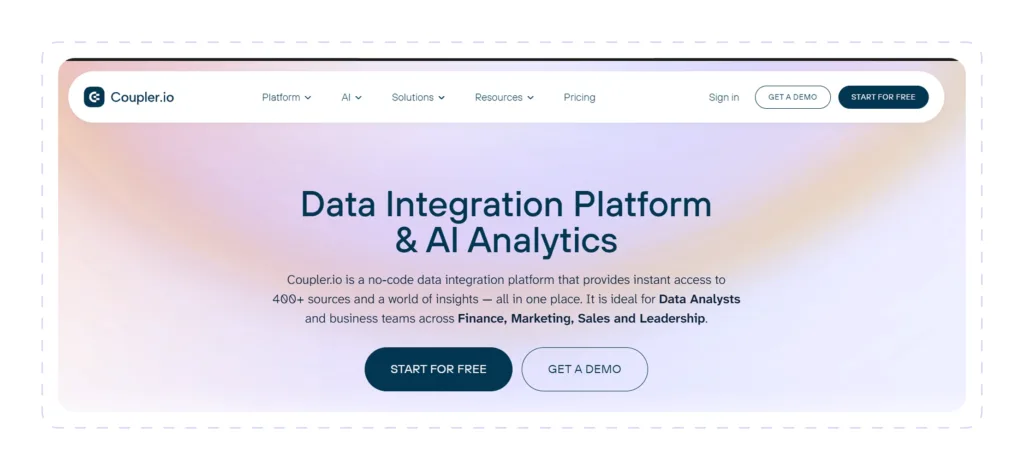
Coupler is a no-code reporting platform that brings together data from 400+ business apps – CRM, sales engagement, and calling tools included. Once it’s in, you can clean and combine the data, then send it on a schedule to spreadsheets, BI tools, data warehouses, or AI assistants.
Best for:
Sales teams, RevOps, and sales managers that need reporting across several tools to stay current automatically.
Key SDR Features
- Pull data from over 400 data sources, including HubSpot, Pipedrive, Salesforce, Calendly, Gong, Outreach, Salesloft, Aircall, Lemlist, and many more.
- Pre-planned refreshes: Choose daily or 15-minute update cycle as per plan.
- Perform data transformations such as record filtering, formula column construction, source joining, dataset appending, and result aggregation.
Pros
- 230+ dashboard templates: Ready-made options cover Looker Studio, Power BI, Google Sheets.
- AI Insights: Have AI interpret the dashboard results for you – or take the data further in Claude, ChatGPT, or Gemini.
Cons
- Adding more connected accounts pushes the cost up
- Niche CRM structures, such as HubSpot associations
Customer feedback
Coupler has 4.8/5 from 104 G2 reviews and 4.9/5 from 110 on Capterra. Capterra scores it 4.9 for customer service, 4.8 for ease of use, 4.7 for value, and 4.6 for features.
Users most often praise Coupler for its ease of setup, great automation, wide integrations, quick support, and time savings on manual reporting.
The weaker aspects typically become apparent as the situation becomes more complex. There is a little learning curve, complex data model setup can be messy, advanced features are poorly documented, and smaller teams with many connections may find the pricing to be too much.
Pricing
Coupler.io has four paid options, with quite a jump between the main tiers:
- Starter: $24/month on annual billing
- Active: $99/month on annual billing
- Pro: $199/month on annual billing, and the most popular plan
- Agency & Enterprise: Pricing is custom

Octopus CRM | Best Budget LinkedIn Automation Tool for Individual Reps

Octopus CRM is a LinkedIn automation tool that works as a Chrome extension. It automates connection requests, bulk messages to first-degree connections, profile visits, and skill endorsements, as well as a simple built-in CRM with LinkedIn performance statistics.
Octopus CRM functions as an inexpensive LinkedIn outreach layer in this SDR stack.
It gives individual reps and small teams a cheaper way to run basic LinkedIn prospecting – connect with a lead, send a thank-you message, then follow up – without paying for a full cloud-based automation platform.
Best for:
Individual SDRs, founders, recruiters, and small teams looking for affordable LinkedIn automation for basic connection and follow-up campaigns.
Key SDR Features
- LinkedIn funnels: Combine connection requests, thank-you messages, skill endorsements, and follow-ups into a simple automated sequence to warm up prospects.
- Profile visits and endorsements: Auto-visit profiles and endorse up to 7 skills to trigger “who viewed your profile” notifications and build familiarity before outreach.
- Personal CRM and analytics: Store leads in a dashboard and track profile views, search appearances, Social Selling Index, and campaign acceptance and response rates.
Pros
- HubSpot & Zapier integration
- Works with LinkedIn Free, Premium, Sales Navigator, and Recruiter accounts
- 7-day free trial with no credit card required
Cons
- Chrome-extension-based
- Not a CRM system of record, data provider, or calling tool
Customer feedback
To compile this listicle, we looked at public Octopus CRM customer reviews as of late September 2026 from Trustpilot, G2, and Capterra.
Trustpilot had Octopus CRM at 3.5 out of 5 over 203 reviews, with only 2 reviews posted in the last 12 months. G2 showed 4.3 out of 5 across 118 reviews. Capterra showed 4.6 out of 5 across 274 reviews, with 4.4 for ease of use, 4.2 for features, 4.5 for value for money, and 4.4 for customer service.
Reviewers consistently give Octopus CRM high marks for its user-friendliness, reasonable price, ability to streamline connection requests and messaging, informative tutorial videos, and quick response from support staff.
Pricing
Octopus CRM gives you four paid tiers to choose from, with one LinkedIn account included in each. There isn’t a free plan. You do, however, get 7 days to try any of the plans for free, and there’s no credit card needed to start.
- Starter: $6.99/month, billed annually
- Pro: $9.99/month, billed annually
- Advanced: $14.99/month, billed annually
- Unlimited: $24.99/month, billed annually

GoTo Meeting | Best for Reliable, Low-Cost Sales Meetings and Demos
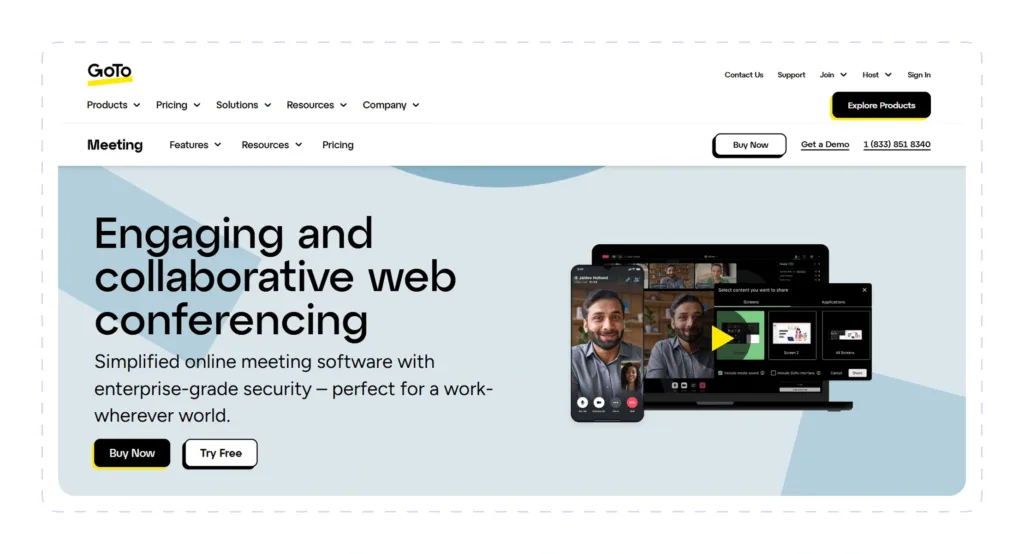
GoTo Meeting is a video conferencing platform for sales demos, client calls, and online meetings. It includes HD video, screen sharing, recording, transcription, AI summaries, and dial-in audio.
In this SDR stack, GoTo Meeting takes over once it’s time to actually speak with the prospect.
After someone books through a scheduling tool like Calendly, reps and AEs can use it for discovery calls and product demos, record those conversations, and get AI summaries of what was discussed. And there’s less friction for the prospect, too – they can join straight from a browser without downloading anything.
Best for:
Small and mid-sized sales teams that need a simple, affordable tool for discovery calls, product demos, and client meetings.
Key SDR Features
- Easy joining for prospects: Prospects can join straight from their browser without installing an app, or dial in by phone – making it quicker to get into a call.
- Screen sharing & presenter tools: Make demos easier to follow with screen sharing, presenter switching, and drawing or remote controls.
- Cloud recording, transcription, and AI summaries: Record calls and get transcripts, AI summaries, and Smart Assistant notes.
Pros
- Stable connection and crisp audio, even when your internet isn’t great
- Reasonable per-organizer pricing – attendees can join without paying for a license
Cons
- Recording, transcription, and AI summaries only come with the Business plan or above
- Professional meetings top out at 150 participants; Business and Enterprise raise that limit to 250
- Reviewers often say the interface feels dated next to Zoom or Microsoft Teams
Customer feedback
Currently, the most positive reviews of GoTo Meeting are praising ease of use, easy setup, reliability, easy screen sharing, clear audio and joining without installs via browser.
Most common negative reviews mention outdated or unintuitive interface, occasional audio and connection issues, limited integrations and features, slow customer support, and features locked behind higher plans. On Trustpilot, most complaints focus on auto-renewals, cancellation difficulties, and billing disputes.
Pricing
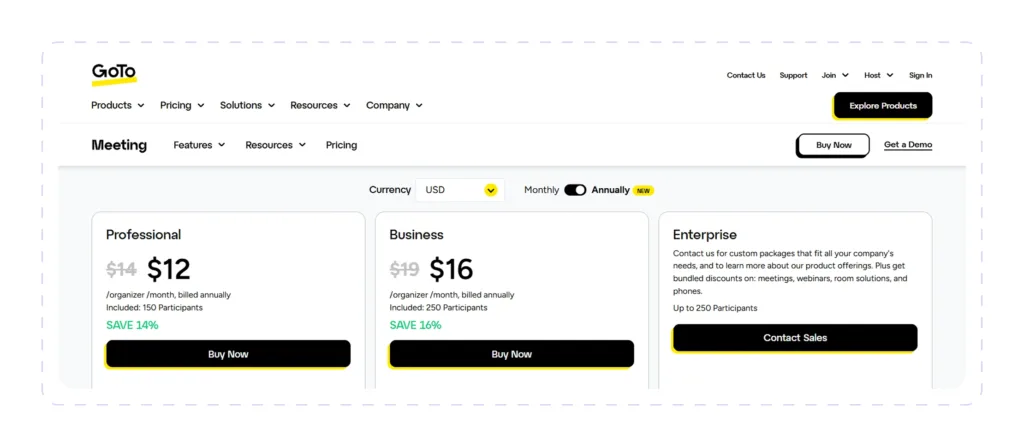
GoTo Meeting uses per-organizer pricing – hosts need a paid license, while attendees join for free.
- Professional: $12/organizer/month, billed annually
- Business: $16/organizer/month, billed annually
- Enterprise: Custom pricing
- Free trial: 14 days, no credit card required
How These Tools Work Together in a Real SDR Stack
Of course, this list isn’t a recommendation to use all 12 tools. It’s a map of the SDR workflow, showing you where each tool fits and which part of the sales process it can strengthen.
Pro-tip! Your exact mix will depend on your sales process, priorities, and existing stack, but this gives you a practical picture of how the pieces can work together.
That said, a mature SDR team could use all 12 as part of the same stack.
Here’s one example of how that might look for a team that relies heavily on LinkedIn for prospecting and outreach.
Possible Scenario
A team could begin with ZoomInfo to identify target accounts and decision-makers, then move on to Cognism for verified mobile numbers or more comprehensive international contact information.
Once the list is ready, Dripify takes over as the outreach layer, allowing reps to run LinkedIn and email sequences, manage replies, test messages, and keep conversations moving.
Pro-tip! For very small teams or individual reps that only need basic LinkedIn automation, Octopus CRM could be a perfect match here.
From there, choose a CRM based on your team’s needs: HubSpot Sales Hub for an all-in-one CRM and sales engagement hub, Pipedrive for a simpler visual pipeline, or Agentforce Sales for larger teams with more complex sales processes.
When prospects are ready to talk, Calendly helps them book time without back-and-forth emails. GoTo Meeting can be used for discovery calls or demos, while Gong records and analyzes those conversations for coaching and deal insights. If the team also relies on phone outreach, Dialpad adds calling, SMS, call summaries, and live coaching.
For reporting, Coupler.io can pull data from different tools into dashboards, so managers can see which campaigns, reps, and channels are actually creating pipeline.
Final Word
You definitely don’t need another sales tool just because it made someone’s “best SDR software” list.
What you need is the right tool for the problem your team is trying to solve:
- If finding the right prospects is the challenge, that might mean starting with ZoomInfo or Cognism.
- If you already know who you want to reach but need a better way to turn those prospects into conversations, Dripify makes more sense.
- Keeping track of deals, handoffs, and activity starts getting messy? That’s where a CRM like HubSpot, Salesforce, or Pipedrive earns its place.
- Finally, Calendly can take care of the next step by making it easier for interested prospects to actually get on the calendar.
From there, your stack can grow with you. Add calling, coaching, conversation intelligence, or reporting when those needs become real, not simply because another tool exists.




Prospect and close deals at scale
Run your LinkedIn or email campaign today, see results in 48 hours.
Free 7-day trial included
Book a demo (for teams of 10+)
