
Mass Email Campaigns: How to Scale Without Sounding Mass-Produced


Key Takeaways
- Mass email isn’t the problem; generic mass email is. Campaigns that definitely turn heads stand on segmentation and relevance, not maxing out the number of emails sent.
- Personalization rules. Go beyond first-name variables and dig prospect-specific information; the more unique to them, the better. Aim for at least a polite “Thanks for noticing.” It’s a good hook for starters.
- Protect deliverability at all costs. Before busting volumes, verify addresses, warm up your domain, pace sending activity, weed out bounced contacts, and make sure all the pre-send essentials are in place.
- Use different touchpoints to make them recognize you. Email, combined with other channels like LinkedIn, makes your out-of-the-blue drip less cold and intrusive.
- Let the performance data do the talking. Bounces typically mean your list quality is poor; high delivery rates and zero replies may signal a problem with your content, targeting, or offer. Figure it out.
- Dripify helps you do all of the above at scale. Find verified business emails, filter and segment leads, personalize outreach with built-in and custom fields. With Dripify email automation tool you can run multichannel sequences with email + LinkedIn, control sending activity, and measure campaign performance in one workflow.
Hit send on a 5,000-item list. Get your reward in a week: very few opens, three unsubscribes, and then none at all.
Feeling like you’re shouting into thin air? You’re not alone.
Contents:
The majority of senders managing mass email campaigns today are in a similar predicament. Engagement is subtly declining with each blast, and you’re left to wonder why these seemingly scalable email campaigns aren’t working.
It’s not the channel’s bug, though. Your email service provider has learned how to detect and de-index generic and unsegmented mass email campaigns. That’s the reason. The more mass emails you shoot, the lower the performance of your subsequent email messages will be.
Fortunately, mass email campaigns are still very much effective for those who target and personalize.
Omnisend’s 2026 experiment showed that targeted emails made up just 2% of all sends yet drove 30% of email revenue. They earned $2.87 per send versus just $0.18 for generic scheduled campaigns. This is a 16x difference.
Belkin’s findings in 2025 confirmed that personalized subject lines, including questions, have a 46% open rate versus just 35% without, which is a 31% gain in visibility.
For those who struggle with bulk email campaigns or are still questioning them, this post kills multiple birds with one stone. You’ll learn what mass email campaigns actually are, which types are worth running in 2026, and get tips on how to send them (including Dripify feature set, too).
What Are Mass Email Campaigns?
A mass email campaign is a single message, or a coordinated sequence, sent to a large group of recipients at once. The term gets used loosely alongside “email blast” and “bulk email,“ but there’s a difference in practice.
An email blast is unsegmented: the same message to everyone, with reach prioritized over relevance.
In a well-executed mass email campaign, the target audience is still huge, but the contact list is split and the content is tailored to each group. The scale is the same; the email marketing strategy is different.
Why Send Mass Email Campaigns
- Reach at a price that no one else can match. Nothing else except for mass email sending can put your message in front of thousands of contacts for a few pennies each.
- Control and reliability. Unlike channels that rely on algorithms, you have complete control over when and who gets your message with campaign scheduling.
- Mass prospecting without scaling headcount. Mass email campaigns let your sales reps contact hundreds of B2B prospects without having to write each letter from scratch. With well-thought segmentation, personalization, and automation workflows, even a tiny small team can work a much bigger pipeline without adding more people.
- Free lead scoring. Instead of treating opens and clicks as engagement metrics, some companies use them as a filter: those who click a specific link in an outreach campaign are automatically identified as “in-market” and routed to sales for personal follow-up. The mass email campaign itself becomes a free lead-scoring tool: you’re not selling yet, but subtly figuring out who is paying attention.
- Email List hygiene. If you practice bulk email marketing, bounces and dead addresses will definitely show up at some point. An email list hygiene will clean up your CRM data, which you often share with your sales, support team, and payment systems. Companies that never send out bulk email campaigns end up with outdated contact lists that no one notices until they break something else.
Types of Mass Email Campaigns That Work For B2B
- Drip & nurture sequences: automated drip campaigns related to email marketing triggered by a signup, delay, or any other action, moving someone from awareness to decision.
Why it works: instead of arriving at whatever time, a message is triggered by actual activity, therefore landing at the peak of interest and bringing in a natural response from email clients.
- Follow-up campaigns: a thread of emails sent to B2B prospects after the initial intent gets no response, keeping your name in front of them.
Why it works: there may be interest even if they don’t respond. Sometimes prospects aren’t ready to talk right when you send your initial email. With a strategically placed follow-up, you can re-engage their interest without kicking off the conversation once again.
- Outbound/prospecting campaigns: mass email for B2B lead generation, often paired with LinkedIn or SMS campaigns.
Why it works: cold emailing on its own is a numbers game with no guaranteed results. But combine it with LinkedIn or other touchpoints, and prospects start seeing the same name more than once, building enough familiarity and trust to eventually respond.
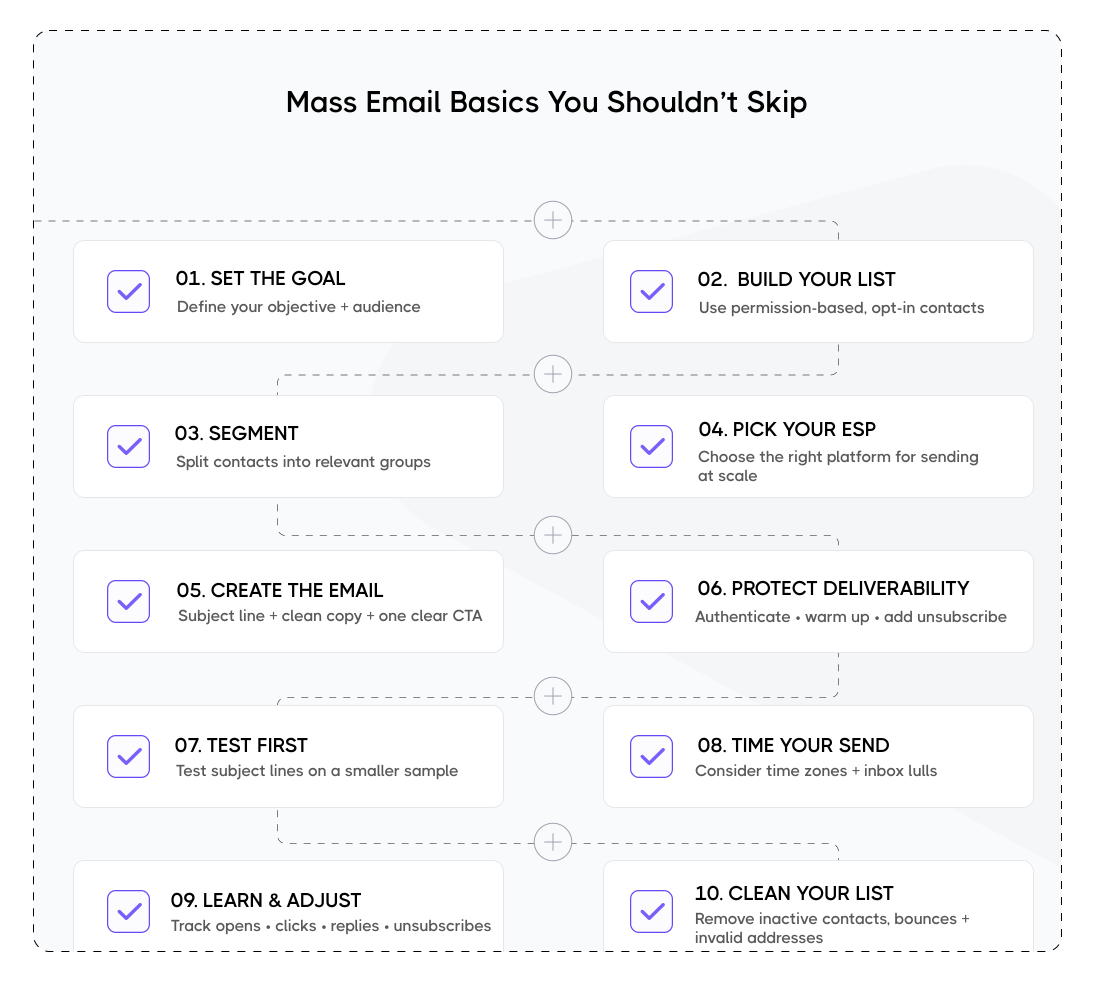
How to Send Mass Email Campaigns: Tips Beyond the Basics
Send from a person, not a brand
Instead of “hello@company.com,” send your mass email campaign through the name and inbox of a person, like the founder or a sales rep. People and mailbox companies trust person-to-person mail more than brand-to-inbox mail, even though the content is the same.
Pace the mass send
Pour it out slowly over several hours instead of firing it all at once to 1,000 people. As a result, spam filters will see this as less of a mass email campaign, and you can catch a bad subject line or a broken link early after the first batch, not after all 1,000 have been sent.
Add “reply to unsubscribe”
Include a clear call to action to reply (“just hit reply and let me know”) in your campaigns rather than merely an unsubscribe link. You will definitely reduce spam complaints since those who are irritated have other options besides clicking “report spam.” Plus, you can learn why people are unsubscribing for free.
Send the same email twice to non-openers
Many recipients can simply miss your first send because it’s lost in a pile of other emails, they were busy, their cat died, or whatever.
Resending your outreach campaign only to those who didn’t open, say, 2-3 days later with a different subject line is a low-effort option to reclaim some of the lost attention. Moreover, it’s a really clever hack, as most major email platforms provide it as a one-click feature for this reason.
Do not blindly follow “best send time” tips
Everyone sends on Tuesday at 10 a.m. because a blog advised them to, so that’s peak inbox competition. Sending messages at an off-hour (Sunday evening, early Friday) can result in less competition for attention, even if raw open rate standards appear slightly lower.
Pro tip
Segment by when each contact receives it and how they act upon that. Night owls could get them at 9 p.m., early risers at 7 a.m., etc. Manually pacing sends in this manner (even without automation software) often outperforms one-size-fits-all or “recommended” scheduling.
 Pro tip
Practice “coming soon” campaigns
Before the real bulk send, start with a short, low-content email to alert everyone that something is on its way. It prepares your audience to anticipate and open the actual email. Once again, it is a completely free option to test deliverability on a smaller, lower-stakes message first.
Mimic “personal” formatting at scale
Unlike heavily designed marketing emails, use plain text, avoid fancy email outreach templates, and include a casual sign-off to visually mimic a 1:1 email, even when sending to thousands. This works against spam filters (fewer marketing-style HTML triggers) and against reader instinct (looks less like an ad).
How to Run Mass Email Campaigns With Dripify: From Setup to Send
Dripify began as a LinkedIn automation tool, but its real strength for bulk outreach is its email functionality: it doesn’t send bulk messages from a shared server. It sends through your own Gmail or Outlook email account, so recipients get a message that seems personal, not from an email provider.
With Dripify, you start by connecting your LinkedIn account, bringing in your leads, and narrowing down the list. From there, build your sequence, work email into the flow wherever it makes sense, review the setup, and launch.
Here’s how to put Dripify to work for mass email campaigns, whether you’re using email on its own or pairing it with LinkedIn:
1. Connect your mailbox
Go to your Dripify account settings and click Connect email.

Choose Gmail or Microsoft Outlook, then complete the sign-in process.

Pro tip
Keep in mind that each Gmail or Outlook mailbox can only be connected to one Dripify account at a time. If you’re connecting a corporate Outlook account, your Microsoft administrator may need to approve the connection first.
2. Add leads to your campaign
Bring in your audience from LinkedIn Basic Search, Sales Navigator, Recruiter, My Network, LinkedIn Events, Posts, or Group Members.

You can also paste individual LinkedIn profile URLs or upload a CSV containing profile URLs, which is especially handy when you already have a list prepared for outreach.
Pro tip
LinkedIn Basic and Recruiter searches support up to 1,000 leads per search, while Sales Navigator lets you add up to 2,475.
3. Find verified email addresses
Before you narrow down your list for an email campaign, check which prospects have usable addresses. You can run Email Finder from the following sources:
- Leads list

- An individual profile

- Import your own email addresses via CSV and map them to Dripify’s Custom Email field for outreach.
Pro tip
Dripify can work with three addresses: a Custom Email you provide, a verified Business Email found by Email Finder, or an email pulled from the prospect’s LinkedIn profile. If a lead has more than one, Dripify prioritizes them in that order when outreaching.

- Add the Find Email action before Send Email in your sequence to look up emails on the go.
If no email is found, simply route the lead to any LinkedIn action instead and keep the outreach moving.

Pro tip
Each Dripify subscription includes 100 Email Finder credits per month at no extra cost, and failed searches don’t cost a credit. Dripify finds verified business emails for around 45-55% of leads on average, including 2nd- and 3rd-degree connections. This means you can continue the outreach by email even while a LinkedIn invite is still pending.
4. Filter and segment your lead list
Once you know which leads have email addresses, use Dripify’s filters to carve out the right segment for your next send.

You can filter by general filters such as Email Available, Email Sent, Replied by Email, Replied on LinkedIn, Invite Sent, Accepted Invite, Pending Invite, Messaged, Message Viewed, Profile Viewed, Followed, Liked, InMail Sent, and other activity or lead statuses.
You can narrow things down further with custom filters based on your own criteria or filter out failed actions, paused leads, and blacklisted prospects. For another layer of segmentation, use Tags such as Interested, Not Interested, Meeting Booked, or Ghosted, or create your own.

Once you have the segment you need, you can move those leads to another campaign, blacklist or remove them, or export the list.
5. Build your sequence
Use Dripify’s visual workflow builder to map out what happens before and after each email.
Mix Send Email with various LinkedIn touchpoints like profile views, connection requests, follows, likes, and messages, then use delays and conditions to control the flow.

Pro tip
When you add Send Email, Dripify automatically adds an If email available condition. Leads with an email can continue down the email path, while those without one can be routed to a LinkedIn action instead, helping you build familiarity before the email lands in their inbox.
6. Personalize emails
Dripify gives you 20+ built-in variables to personalize your subject line and copy with details such as the prospect’s name, company, position, location, mutual connections, etc.

For deeper personalization, use Custom Lead Fields to bring your own prospect data in via CSV. Could be pain points, industry details, event names, custom URLs, or a different opening line for every lead.
Pro tip
For follow-ups, you can choose whether each email continues in the same thread or starts a new one. Dripify keeps emails simple and personal, making email campaigns feel closer to one-to-one outreach than generic marketing blasts.
7. Set safe sending limits
Since emails go through your own connected mailbox, your domain keeps its own sending reputation.
Dripify caps email activity at 50 sends per day on Basic and 200 per day on Pro and Advanced plans, but that doesn’t mean you should hit the ceiling straight away. Start lower with a fresh mailbox or domain and build volume gradually, or use Activity Control to ramp up activity automatically.

Good to know:
Dripify also helps protect your sender reputation when running mass email campaigns. Emails found through Email Finder are verified before sending, while smart delays let you pace messages instead of firing them off in one large burst.
 Good to know:
If an email bounces, Dripify automatically stops any further sends to that address. And once a prospect replies, their sequence is paused, so they won’t keep receiving automated follow-ups after they’ve engaged.
8. Monitor your performance
Use Dripify’s outreach campaign analytics tool and performance dashboard to track results across all your campaigns or drill down into a specific one. Alongside LinkedIn activity such as invitations and replies, you can see how many leads received an email and replied via email.

For a closer look at your mass email performance, Step Analytics breaks down each Send Email step by Sent, Delivered, Bounced, and Reply Rate.
This helps you see where the problem actually is. A rising bounce rate can flag list quality issues, while plenty of deliveries but few replies may mean it’s time to rethink your targeting, copy, or offer rather than simply send more emails.
More Dripify Features Worth Using for Mass Email Campaigns
Here’s what else Dripify gives you for mass email:
Save and reuse sequence templates
Once you find a mass email sequence that works, save it as a template instead of rebuilding it for every new campaign. Your template can be email-only, LinkedIn-only, or combine both channels, complete with the actions, conditions, delays, and copy you want to reuse.
For sales and marketing teams, Managers and Owners can also turn proven sequences into Team Templates, giving everyone the same tested starting point for future outreach.
Pro tip
Sequences using Custom Lead Field variables can currently be saved as personal templates only, but not as Team Templates.
Run multiple targeted campaigns at once
On Pro and Advanced plans, you can run multiple bulk email campaigns in parallel, making it easier to split bulk outreach by audience, offer, or messaging angle.
In this case, Dripify divides your daily actions evenly between all active campaigns, helping keep activity controlled as you scale.
Keep lead lists fed automatically
On the Advanced plan, Evergreen Lead Upload keeps adding fresh prospects from LinkedIn Post engagement and supported Sales Navigator sources after the initial list is collected.

Pair it with Email Finder, and those new leads can have their business emails found and verified as they enter your sequence, giving an ongoing campaign a steady feed of new email-ready prospects instead of letting the list run dry.
Final Thoughts
Do not believe anyone who says that mass email campaigns are dead in 2026. What’s actually dead is outreach that is mass-produced.
The difference between effective mass email marketing and mass-produced outreach is relevance. Better targeting, verified contacts, on-point personalization, controlled sending, and timely follow-ups are what keep outreach campaigns alive and kicking. No matter what haters say. They just don’t know how to run them.
For B2B outreach, sprinkling an extra channel into the mix, say, LinkedIn, makes mass email even stronger. Instead of relying on a single email to do all the work, you can create multiple touchpoints and build familiarity so “cold email” isn’t that cold in practice.
Dripify marries it all together. Find verified business emails, segment and personalize your outreach, combine email and LinkedIn in automated sequences, control sending activity, and track what actually generates replies, all from one place.
Don’t scale the noise. Scale what gets replies. Try Dripify today for free and turn your mass email campaigns into personalized conversations tomorrow.




Prospect and close deals at scale
Run your LinkedIn or email campaign today, see results in 48 hours.
Free 7-day trial included
Book a demo (for teams of 10+)
