Choose Dripify: if you seek a single, safety-focused sales platform for LinkedIn + email automation.
Choose Expandi: if signal-based prospecting is the foundation of your outbound strategy.
Choosing between Expandi and Dripify?
Both are cloud-based LinkedIn automation platforms built for scalable outreach, but they cater to different workflows and sales strategies.
️Dripify is better suited for teams seeking a unified outbound platform that combines LinkedIn and email outreach, analytics, team management, and lead enrichment in one workflow.
Expandi is ideal for teams focused primarily on LinkedIn automation and signal-based prospecting.
Expandi vs Dripify: Feature Comparison at a Glance
End-to-End Funnel Analytics Across LinkedIn & Email
Unified Recent Activity Stream
Feature name
Dedicated IP Address
LinkedIn Daily Limits
Manual Daily Limits Adjustment
Working Hours Scheduling
Cooling Down Feature
Randomized Delays
Time Zone Configuration
Activity Control Center
Adaptive Activity Ramp-Up
Limits increase gradually based on account health
Automatic Safety Reductions
Human-Like Activity Simulation
Pause Lead After Message Reply
Pause Lead After Email Response
Resume Paused Leads
Expandi Overview
Expandi positions itself as a LinkedIn-first sales automation platform focused on hyper-personalized outreach, advanced workflow flexibility, and intent-based prospecting for teams in need of highly customized outbound campaigns.
Key features
In-Sequence ICP Filtering
Running a business is not that easy these days! Put your sales prospecting on complete autopilot, so you could focus on other important things
Signal-Based Prospecting & Engagement
Monitors account health signals like pending invites, account type, activity history, and outreach performance to automatically adjust daily limits and maintain natural growth patterns.
Hyper-Personalization with Images & GIFs
Expandi integrates with tools like Hyperise and Sendspark to add personalized images, GIFs, and videos into outreach campaigns, helping messages feel more 1:1.
Workspace Management
Expandi offers agency-style workspace management with roles, permissions, shared reporting, multi-account handling, and centralized team collaboration features.
No native advanced personalisation (paid add-on required)
Limited native email capabilities
Manual setup and limit tuning required
Pros of Expandi
Strong signal-based engagement targeting
Advanced personalization with dynamic visuals
Solid fit for agencies and multi-client teams
Broad third-party integration ecosystem
Compliant outreach pacing with built-in safety settings
Expandi Pricing
Free Trial
14 days
card needed
Business
$99
per month per 1 seat
Agency
+10 seats
at a custom price
Dripify Overview
Dripify positions itself as a multichannel sales automation platform for teams, agencies, and business owners who want LinkedIn outreach, native email automation, lead management, analytics, and team collaboration running under one roof.
Unlike LinkedIn-only tools, Dripify is built as an audience warm-up and lead-nurturing system that moves prospects from awareness to conversation through multi-touch engagement.
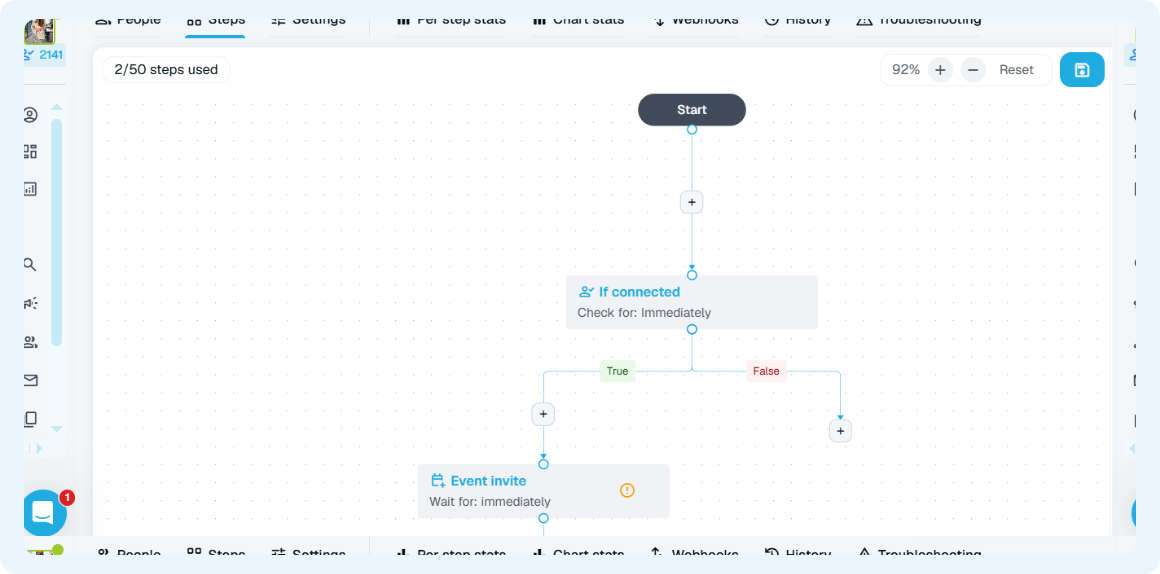
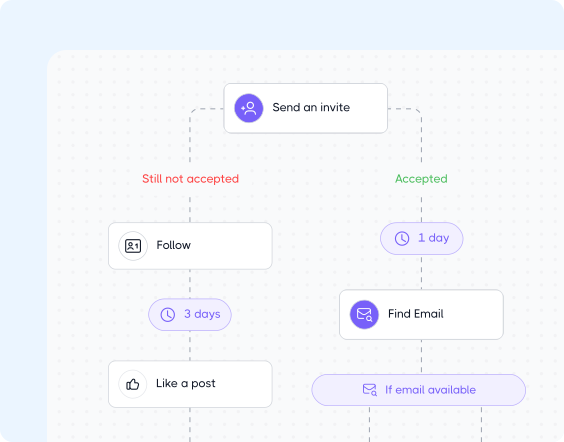
Unified LinkedIn & Email Outreach Flows
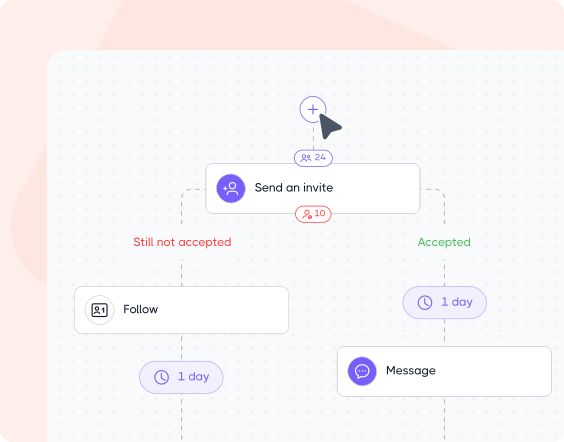
Dripify combines LinkedIn and email touchpoints in a unified sequence, making prospect nurturing more flexible than traditional LinkedIn-centric outreach flows.
Email acts as the opener, follow-up layer, or final conversion push, while automated LinkedIn workflows adapt the rest of the conversation around prospect behavior.
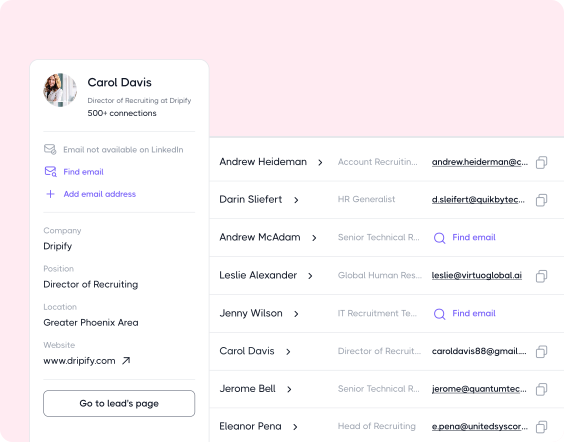
Built-In Email Search & Verification
While many LinkedIn automation tools rely on external enrichment platforms, Dripify includes native email discovery and verification directly inside its outreach sequences.
Users can:
Find corporate emails beyond LinkedIn
Instantly verify email accuracy
Monitor deliverability
Automate cold email campaigns without leaving the platform
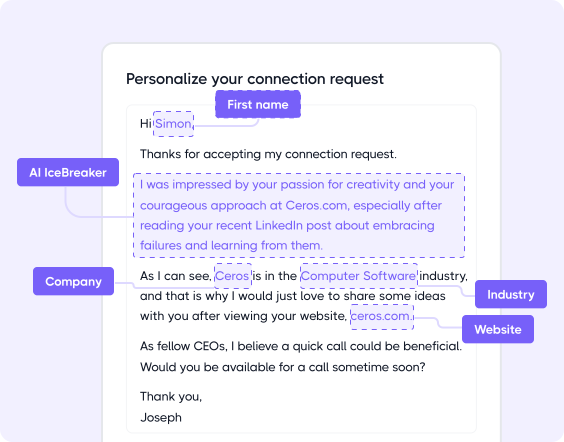
Human-like Outreach & Personalization
Dripify combines 20+ personalization variables with enriched B2B lead data to tailor outreach around prospect activity, intent, and engagement signals.
The platform also includes:
Behavior-based outreach flows with conditional branching
Smart delays and human-like pacing
Dynamic prospect journeys based on replies, profile activity, and connection status
18+ pre-built sequence templates for various outreach scenarios
Real-Time Campaign Editing
With Dripify, you can revise active campaigns anytime without rebuilding sequences from scratch. Add warm-up actions, insert new steps, extend branches with follow-ups or conditions, adjust delays, and re-engage completed leads directly inside your workflow.
Dripify also lets you edit sent LinkedIn messages, InMails, and connection request notes directly from the unified Inbox, making it easy to fix typos, update details, or adjust messaging without switching back to LinkedIn.
Account Safety Infrastructure
One of Dripify’s key differentiators is its built-in account protection system designed to minimize risky automation patterns and maintain more natural LinkedIn activity.
Key safety features:
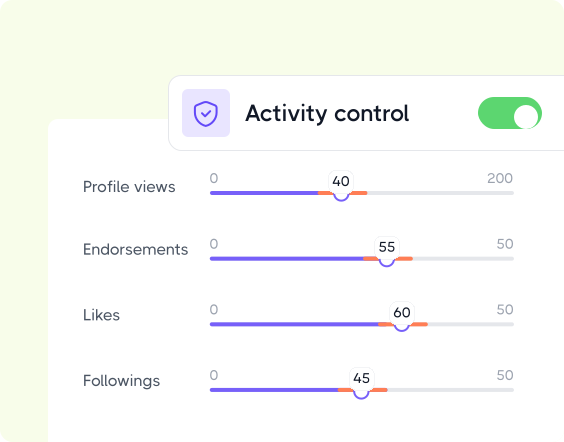
Activity Control – automatically optimizes daily outreach limits around account health, pending invites, activity history, and performance signals.
Working Hours – runs actions only during selected time windows for more realistic activity behavior.
Cooling-Down – detects risky activity spikes or repeated failed actions and temporarily pauses automation to help prevent LinkedIn restrictions.
Team Management
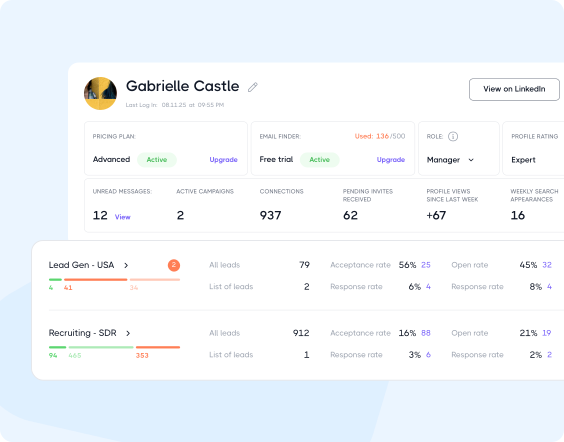
Dripify provides a unified team management system for agencies, sales organizations, recruiters, and outbound teams growing LinkedIn outreach across multiple users and campaigns.
With Dripify, teams can:
Manage up to 50 LinkedIn accounts from one workspace
Track outreach activity & team performance in real time
Control access with team roles and permissions
Assign leads across SDRs, recruiters, and account managers
Standardize onboarding with shared workflows
Collaborate on campaigns without duplicate work
Live Campaign & Performance Insights
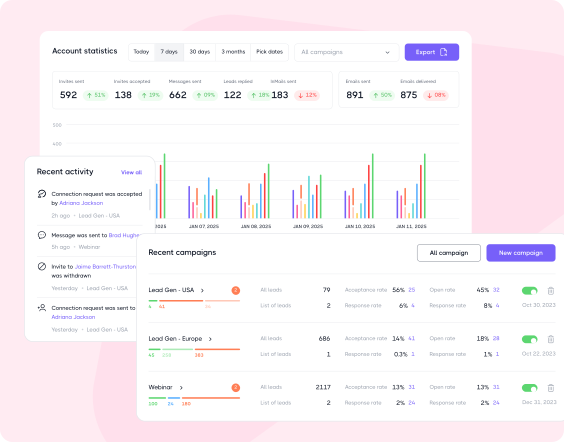
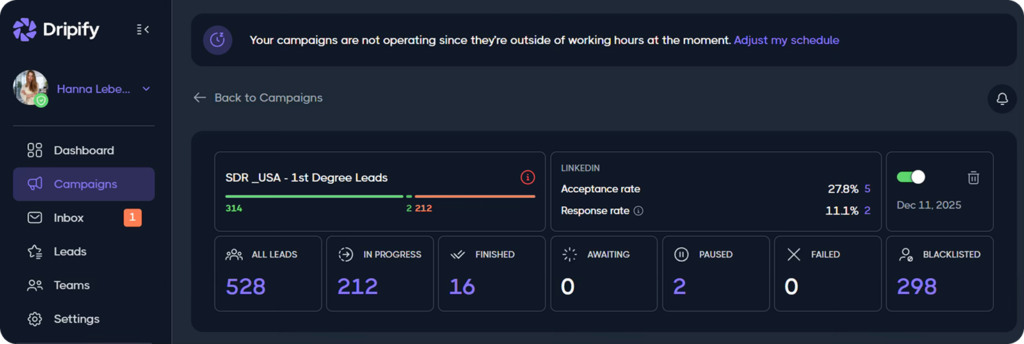
Dripify includes a comprehensive LinkedIn analytics environment designed to give teams complete visibility into outreach performance, campaign efficiency, prospect engagement, and overall prospecting activity.
The analytics infrastructure covers:
Action-level sequence analytics
Reply & acceptance rate tracking
Engagement performance monitoring
Campaign-wide performance overviews
Historical outreach comparisons
Unified reporting across campaigns, accounts, emails, and LinkedIn activity
What are the Cons of Dripify?
Prioritizes multichannel outreach & personalization over native signal-based prospecting
Personalized GIF and video outreach requires external tools
Best for LinkedIn + Email outreach, not a full CRM
What are the Pros of Dripify?
Native LinkedIn & email outreach inside one sequence
Built-in Email Finder & verification tools
Unified LinkedIn & Email Inbox
Advanced workflow branching and behavior-based automation
Advanced personalization with AI-assisted optimization
Flexible live campaign editing
Strong team collaboration and agency support
Centralized lead management across multiple campaigns
Strong account safety infrastructure with adaptive scaling
Beginner-friendly interface with minimal onboarding friction
Dripify Pricing
(per user/month, billed annually)
One Minute Setup
7-Day Free Trial
No Credit Card Required
Pro
$59
per month
Advanced
$79
per month
Enterprise
custom price
Expandi vs Dripify: Head-to-Head Breakdown
Now you’re probably wondering: what actually makes Dripify stand out from Expandi where it matters most?
When it comes to LinkedIn invitation limits, Dripify gives teams significantly more room to scale. While Expandi typically caps outreach at around 300+ connection requests weekly, Dripify supports up to 75 invites daily, pushing outreach beyond 500+ invitations per week. The bigger advantage goes beyond invitation volume itself. Dripify reduces reliance on LinkedIn connection requests by keeping outreach active even after invite limits are reached.
Instead of campaigns slowing down or stalling, teams can continue engaging prospects through native email and free InMail touchpoints. Its multi-channel structure keeps conversations moving regardless of LinkedIn invite capacity.
However, with Dripify, you can enjoy sending up to two hundred connections without risking your account’s safety
Safety & Account Protection
Like Dripify, Expandi includes built-in safety features such as dedicated proxy locations, “Weekly Active Hours” scheduling, randomized delays, and smart throttling across outreach sequences.
However, unlike Dripify, Expandi does not dynamically optimize outreach limits from the start based on live account conditions. Instead, limits are gradually increased through a 14-day warm-up period, which can slow down scaling if you plan to ramp outreach faster.
Expandi also allows users to manually raise custom activity limits up to 100 actions per day. While this offers more flexibility, aggressive settings may increase account risk without careful management. Dripify takes a more controlled approach through its Activity Control system, automatically adjusting daily outreach limits around account health, pending invites, activity history, and performance signals to maintain more natural growth patterns.
Additionally, Dripify includes a built-in Cooling-Down safeguard that detects risky activity spikes or repeated failed actions and temporarily pauses automation to help reduce the likelihood of LinkedIn restrictions.
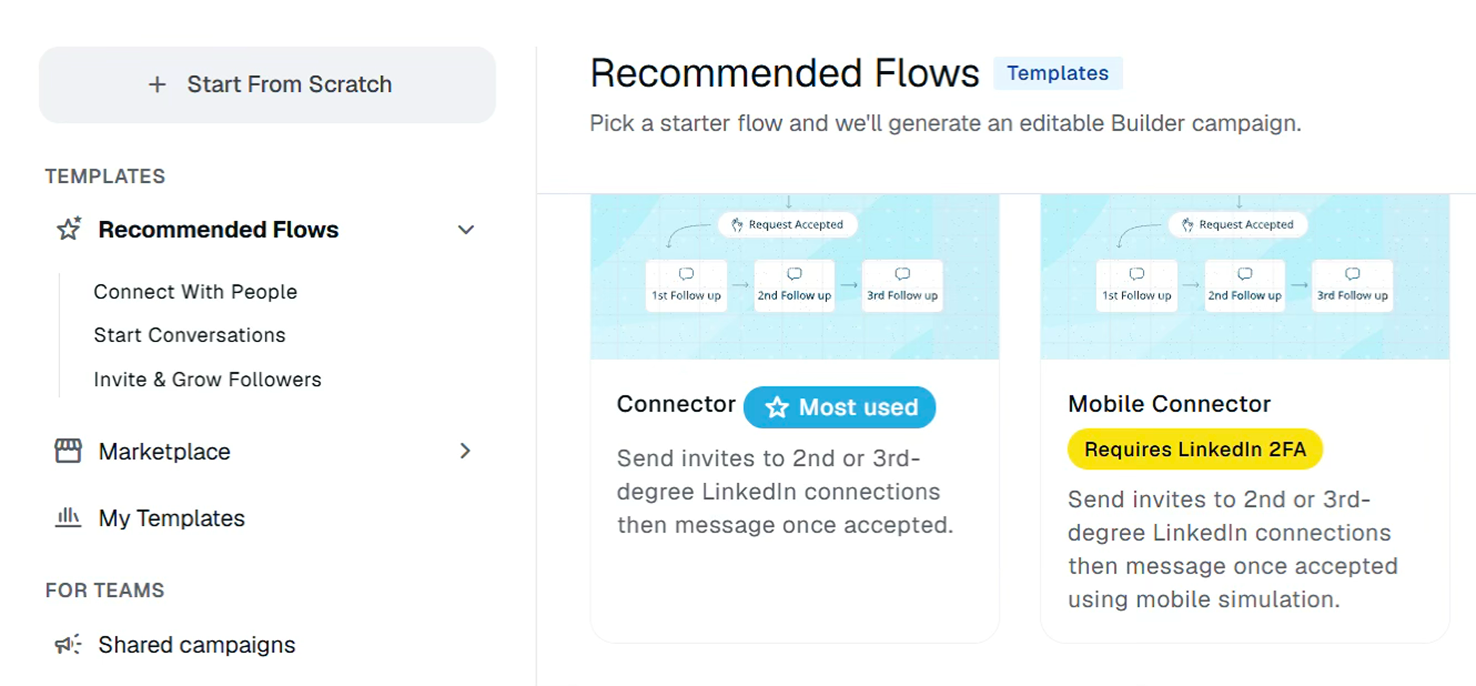
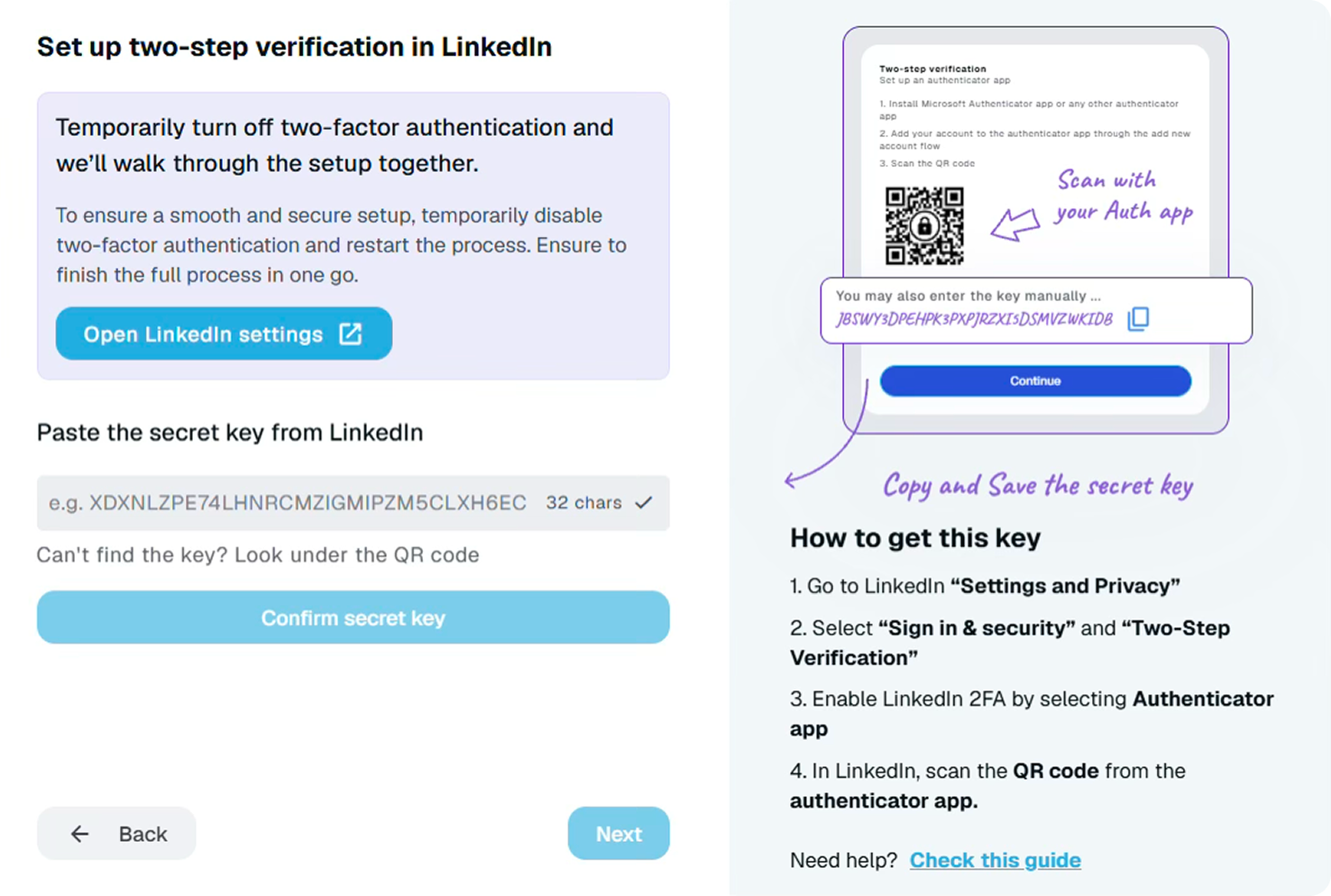
Certain users report issues during the trial setup process in which the secret key verification link is not delivered properly, making the Mobile Connector option inaccessible.
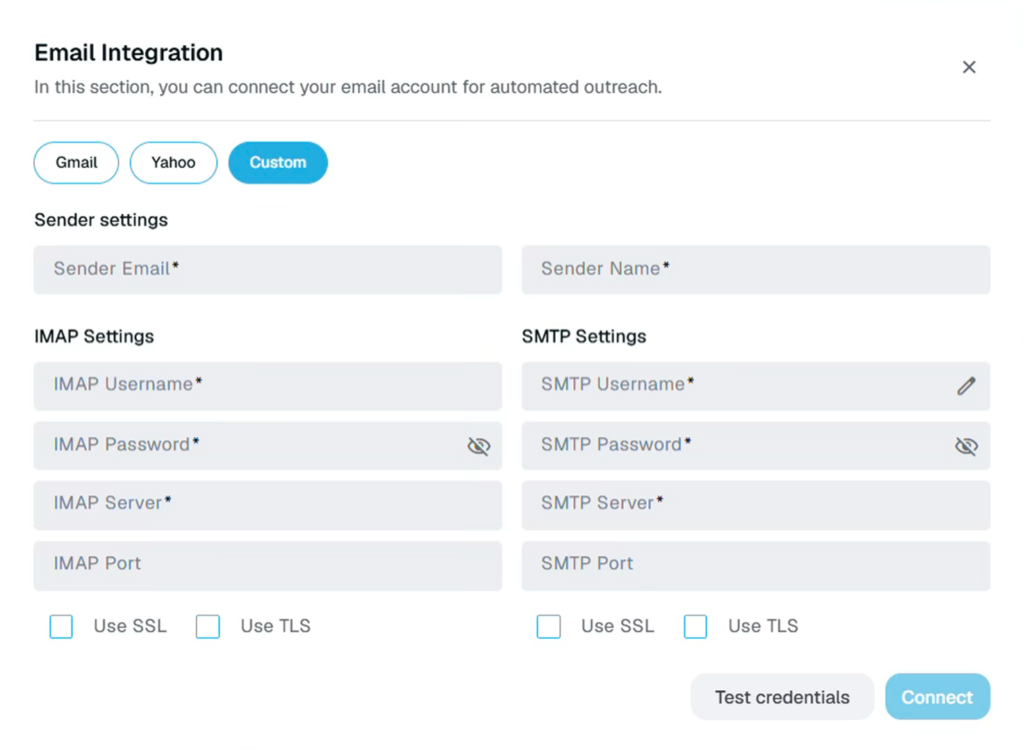
Additionally, connecting an email to an Expandi account can be challenging for non-technical users, since it often requires configuring and optimizing SMTP settings manually. Without proper setup, email steps cannot be included in outreach sequences, which adds extra complexity to launching multi-channel campaigns.
On the contrary, Dripify is exceptionally easy to navigate thanks to its clean, clutter-free interface built around only the essential functions. The platform keeps everything centralized and intuitive, from drag-and-drop campaign building and lead lists to analytics, inbox management, and account settings.
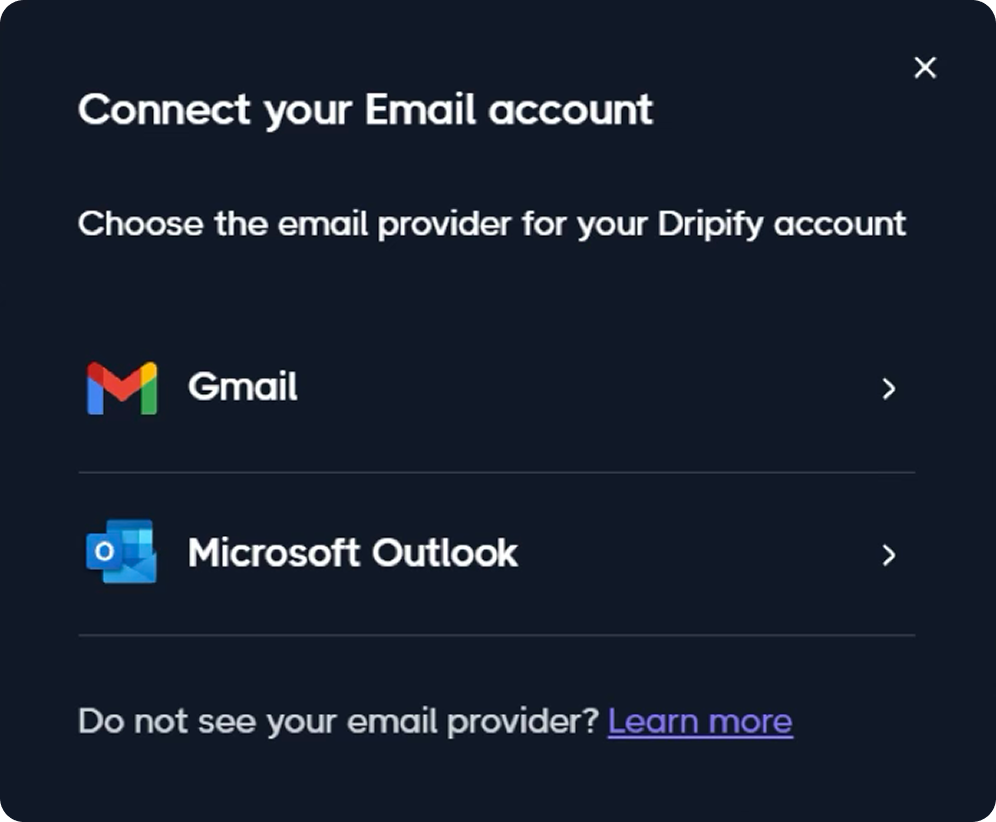
Finally, connecting email is significantly easier in Dripify thanks to native Gmail and Outlook integrations. The setup works through a standard browser-based connection flow, eliminating the need for manual SMTP configuration or technical setup.
Free Trial Experience
Expandi also adds more friction during the initial setup process. Even before fully exploring the platform, users are asked to provide a credit card to access the 14-day trial, which automatically converts into a paid subscription unless canceled.
With Dripify, the onboarding experience is much simpler — users can start a free trial in just one click, with no credit card required upfront.
When Expandi Might Be a Better Fit
If you’re a solo recruiter doing occasional sourcing
If you only source candidates occasionally and don’t run a team, pipeline, or structured sales process, a simpler single-purpose tool like Expandi can easily cover the essentials.
If you like to hand-build very custom setups yourself
Independent consultants, founders, and GTM professionals who prefer hands-on control and don’t mind manually configuring their workflows may find Expandi a suitable option.
If you’re pre-sales process or running B2C outreach
For early founders without a sales process yet, or B2C outreach outside a structured sales motion, Expandi’s lighter, single-channel setup may be enough to start.
Switching from Expandi to Dripify
Switching from Expandi to Dripify? Start with these 3 simple steps.
01. Rebuild Your Outreach Around Multi-Channel Flows
The biggest shift when moving from Expandi to Dripify is changing from a mostly LinkedIn-first workflow into a LinkedIn + email nurturing system. Instead of relying only on connection requests and LinkedIn messaging, recreate your outreach sequences inside Dripify using combined touchpoints:
LinkedIn invites
Profile views
Follows
Messages
InMails
Native email steps
Free InMail follow-ups
This helps reduce dependence on LinkedIn invite limits while keeping conversations active across multiple channels.
02. Import & Organize Lead Infrastructure Before Launching Campaigns
Before turning campaigns live, migrate your lead ecosystem properly:
Export current lead lists from Expandi
Segment leads by ICP, campaign stage, or engagement level
Rebuild reusable lead pools inside Dripify
Map outreach ownership across SDRs or recruiters
Connect CRM/webhooks if needed
Dripify’s centralized lead management and multi-account workspace structure works best when campaigns, tags, and ownership are organized upfront instead of recreated on the fly. This also prevents duplicate outreach or overlapping sequences later.
03. Let Dripify Handle Scaling More Gradually & Safely
One common mistake during migration is trying to instantly replicate Expandi’s outreach volume. Instead:
Warm up accounts gradually
Start with moderate invite and messaging activity
Enable Working Hours and smart delays
Rely on Activity Control instead of manually pushing limits
Use email steps to maintain volume without overloading LinkedIn actions
Dripify’s strength comes from adaptive scaling and human-like pacing rather than aggressive manual activity increases. The safest transition usually happens when teams rebuild campaign quality first, then scale volume progressively.
What Dripify Users Say
Dripify – Best yet. Very simple, very clear, very effective. It is the first product of its kind that has been so simple you can be up and running within 30minutes and has yet to present any downsides.
David H.
CEO, Staffing and Recruiting
Great tool. Dripyfy is very easy to use and very intuitive. I cannot find anything that I do not like with Dripify. It is generating leads for me.
Henrik Fuglsang
Account manager HEXASTATE
Easy setup and start. The trial was well supported and the team have been great in making sure I was confident in using the platform.
James DB
Frequently Asked Questions
No, Expandi is not banned. It is one of the safest ways to automate your LinkedIn outreach. Besides being a cloud-based automation tool, Expandi lets you control and monitor your activities to prevent account restrictions.
No, LinkedIn doesn’t allow the usage of automation tools, and Expandi is no exception. However, Expandi claims to be a reliable and safe automation service that uses complex techniques to bypass the LinkedIn algorithm and avoid getting detected.
You can use Zapier to easily connect Expandi to your Hubspot CRM and push your prospects’ data across. This ensures targeted as well as consistent messaging with your prospects. You can do all this without coming across roadblocks or gaps in communication.
No, Expandi is not available as a Chrome extension. Instead, it comes with a cloud-based application having a native dashboard where you can manage your workflow. Having cloud-based automation ensures more safety and convenience than a browser extension.
Yes, Expandi works just as fine with Sales Navigator as it does with the free LinkedIn or premium version. You can even combine the Expandi trial with the Sales Navigator free trial to start generating leads automatically for free.
Tell us the name of the software you wish to connect with Dripify and explain how exactly you intend to utilize this integration
Suggest an integration
Please fill the following fields to continue
Thanks a ton for suggesting your integration as the next one for us
We love that you took the initiative! We'll check it out and let you know the possibility to implement it in short term. Stay tuned for an update from us!
A/B test your message
Sign up here to be first in line when our exciting new feature rolls out
You’re on the list - stay tuned!
Awesome! Thanks for joining the waitlist! We'll reach out with an exclusive email when it's ready to launch. It might take a bit, but we promise to bring the news straight to you
Free 7-day trial. No credit card required. Cancel anytime
Select topics
Step 1/5
1235
Thanks a ton for requesting your custom masterclass!
Ready to dive in? We hear you loud and clear! Just give our sales team a tiny bit of time to personalize your quote, and we'll be in touch within 24 hours.