
Best AI Reply Generator Tools 2026: 7 Standouts for Engaging Convos


Staring at a message for ten minutes and rewriting the same two sentences for another twenty is a waste of time. A reliable AI reply generator gets you unstuck with quick, context-aware responses ready in seconds.
We compared 7 best AI text reply generators across response quality, customization, integrations, customer feedback, and security to help you find a solution that will save you time without sounding like a dum-dum.
Contents:
See which AI message reply generators deserve a place in your reply workflow.
Quick Picks: Best AI Reply Generator Tools 2026
| Tool | Best For | Starting Price | Biggest Strength | Main Limitation |
|---|---|---|---|---|
| Dripify | B2B sales & recruiting outreach | $39/month (annual) | Personalized LinkedIn + email outreach in one workflow | Built specifically for B2B outbound |
| ChatGPT | Flexible, context-heavy replies | From $7/mo (monthly) | Handles nuance and almost any kind of reply | Often needs prompting and manual copy-paste |
QuillBot | Quick rewrites & polishing | $4.16/mo (annual) | Fast at cleaning up and rewording existing copy | Limited conversation context |
Claude | Nuanced, longer conversations | $17/mo (annual) | Strong at reading context and subtext | No built-in reply inbox |
DeepAI | Casual, low-cost AI use | $9.99/mo (monthly) | Chat, image, video & music tools in one place | Weaker for nuanced replies |
Jasper AI | Marketing teams & brand consistency | $59/seat/mo (annual) | Brand Voice and company knowledge | Expensive for simple reply writing |
Toolsaday | Structured email replies | From $6.66/mo (annual) | Lots of reply controls without prompt writing | Doesn’t integrate directly with inboxes |
Pricing and features are accurate as of August 2026. As vendors regularly update their plans, be sure to check each provider’s website for the latest information before purchasing.
Not every sales rep is much of a writer. One gets a reply out in a minute; another knows what they mean but somehow can’t get it onto the screen.
AI reply generators are especially useful here. They do the wording for you and can keep up when there are dozens of replies in line.
For you to know, that “help” isn’t just a figure of speech. Sales using AI for client communication show about a 28% bump in response rates. Time is another one. 84% thank AI for letting them sell, not wasting time on back-and-forth messaging.
There’s quite a mix of AI reply generators on the market right now. Stuff like ChatGPT can handle almost any task you give it. Other tools are more laser-focused, like customer support, but they come already hooked into the inbox and know the brand voice they should stick to.
The best AI email reply generators do more than automate the basics. They help your personality linger in every message, even when there are numerous messages where a single rep couldn’t manage the volume on their own.
Okay, who says these are for sales only? Marketers, consultants, founders, and recruiters often crutch on them when inboxes are exploding, but every response needs to be personal.
We compared 7 best AI reply generators to help you choose the ones that tie speedy responses to the context your business actually needs.
How We Selected the Best AI Reply Generators 2026
Calling one AI reply generator “the best” misses the point. A catchy reply that you copy into Gmail might be all you need one day, but another time you’ll need something that’s right on the money and sends itself automatically via an integration.
Different problems, different tools.
The best one for you is simply the one that fits how you work at the moment. That’s why we put every single AI text reply generator on this list through the same set of criteria:
- Response quality: Do the AI reply generator’s replies get the message and sound natural enough that you can send them off as is?
- Customization: How well can you tweak the tone, style, language, variations & brand voice to fit your needs?
- Safety controls: What safeguards are used to keep replies accurate, on-brand & free of any silly claims?
- Integrations: Does the AI message reply generator connect with LinkedIn, Gmail, CRM systems, or other places where the conversations happen?
- Customer feedback: What are current reviewers saying about the quality & limitations of the tool?
- Pricing: What are you getting for your hard-earned penny, and is it worth it?
What Are AI Reply Generator Tools?
AI reply generators are tools that analyze an incoming message, instructions, or conversation history and come up with a response that’s tailored to the tone and goal you’re after.
The simplest AI chat reply generator just gives you a text box: paste a message, pick a “friendly” or “professional” tone, and copy the result.
More advanced AI discussion reply generators can read files and long threads, get the context, personalize the reply, plus give you many alternative versions.
Workflow-based tools go even further by drafting inside a business inbox, using CRM data, answering from a knowledge base, or sending automatic follow-ups.
Whichever tool you choose, AI text reply generators skyrocket your reply speed, cut repetitive writing, and spare you the mental load of keeping dozens of conversations straight.
Good to know:
When selecting an AI reply generator worth paying for, look for strong context handling, tone & intent controls, editable outputs, conversation memory, in-depth answers, multilingual support, channel integrations, clear privacy settings & human approval controls. A hasty reply is not useful if it invents a fact, misses the point, or reaches the recipient before anyone reviews it.
 Good to know:
Best AI Reply Generator Tools 2026
Dripify

Dripify is a cloud-based platform that lets you automate your LinkedIn and email conversations with B2B prospects.
Its secret is a reply-gen feature that gets dropped into a bigger outreach workflow: you can use AI to create super-personalized messages and emails, string them together into automated campaigns, and then deal with the responses from a single inbox.
Best for:
B2B sales teams, recruiting agencies, startups, and sales development reps who want to send out loads of tailored prospect messages and follow-ups on LinkedIn and by email.
 Best for:
Response Quality
Dripify has 20+ LinkedIn details to personalize with. Name, company, position, location, industry… they can all be included in the message.
Got something useful that isn’t on their profile? Add it through Custom Lead Fields. An icebreaker, a trigger event, a personal link; whatever you know about that particular lead can become part of your connection note, message, InMail, or email.
There are also AI icebreakers for the opening lines and a data scrubber that cleans up things like credentials, emojis, and taglines before they sneak into your message. Outside context can come in too, via CSV, your CRM, Zapier, Make, or webhooks.
Customization
Conditions give you plenty of room to customize. Say someone accepts your invite, you can move them straight to a message. No acceptance? If Dripify finds their email somewhere along the way, the next step can happen there instead.
Timing is yours to set too, down to the delays between individual actions. And launching the campaign doesn’t freeze it in place. You can still change the copy, add another action or condition, or take certain steps out.
Got the sequence right? Save it for another campaign. Dripify has 18+ templates ready to use, and teams can share their own when everyone’s supposed to follow roughly the same playbook.
Security
Dripify runs in the cloud with a dedicated, region-matched IP per account, so activity looks consistently local rather than automated.
Instead of anti-detect browsers, it relies on human-like pacing; set your own working hours and randomized delays between actions.
Activity Control, a built-in safety algorithm, monitors account health and auto-adjusts daily limits. Technically, it’s there to ramp new or flagged accounts up gradually and override manual settings when it judges lower volume is safer.
Pros:
- Connects the AI-powered copy directly to the action of sending the messages, rather than leaving you to copy and paste
- Uses the prospect’s own live LinkedIn data (plus your custom fields) for more relevant personalisation
- Reply detection and a unified inbox make managing follow-ups and ongoing conversations easy
- Built for repeat, multi-step follow-up sequences rather than one-off copy generation
Cons:
- It’s cloud-only, with a Chrome extension for secure LinkedIn account connection
- It’s built for B2B outbound, so unless you’re into that sort of thing, it might be overkill for traditional email marketing
Integrations
Email sending connects to Gmail and Outlook (more providers on the roadmap). Native CRM syncing covers HubSpot, Salesforce, and Pipedrive, extended via API, MCP, Zapier, Make, and webhooks, plus CSV import/export with custom field mapping.
All LinkedIn and email replies land in Dripify’s Smart Inbox, feeding straight into campaign stats and lead records.
Customer Feedback
Recent, verified G2 reviews highlight strong marks for how natural the automation feels. Users also consistently credit the sequencing and reply-pausing logic for making outreach feel less spammy and easier to manage day-to-day.
Pricing
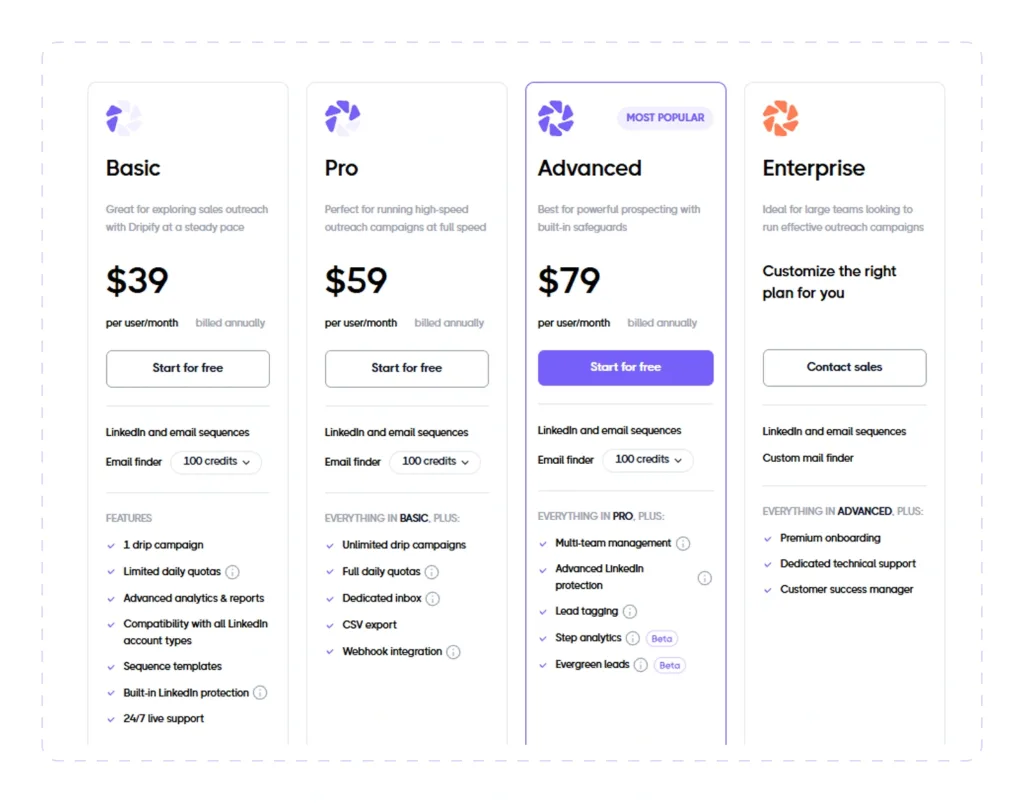
Starts at $39/month (annual billing); 7-day free trial, no credit card required.
ChatGPT
ChatGPT is a known “multi-tool” among AI reply generators. Type in the message, tell it who you’re writing to and what you’re going for, and it’ll work on the draft for you.
Came out sloppy? Too long? Ask again but indicate what’s been wrong. You can also skip the prompt gymnastics and give ChatGPT the source material: a file, a screenshot, or a voice instruction.
Best for:
Anyone who wants one flexible AI assistant that can handle replies across email, work chats, messaging, and other conversations where getting the wording right takes more than 30 seconds.
Response Quality
Occasionally the message is only part of the story. “Sure, no problem” can mean precisely that, or very much the opposite. ChatGPT can see the previous bits and make a good guess as to which one you’re dealing with.
That’s probably where its answers get a little more unpredictable. It’s not perfect, and sometimes it reads too much into things, but it can handle the awkward bits of a conversation rather than just rewriting the sentence you gave it.
Customization
This is probably ChatGPT’s strongest feature. Tone, length, language, structure, directness, number of options…
You can change pretty much everything just by asking. You can even give it samples of your writing and tell it to stick to that style. For people who use it regularly, you can save your preferences and use them every time.
That said, the more generic your prompt is, the more generic the answer tends to be. If you just ask it to “write a professional reply,” don’t be surprised if you get something that sounds like every other professional AI reply.
Security
ChatGPT gives you controls over your chat history and whether conversations can be used to improve the AI.
Temporary Chat is there for when you don’t want a conversation hanging around in your history, while business plans come with additional controls on your workspace and data.
For business customers, OpenAI doesn’t use company data for model training by default. Still, there’s no good reason to dump passwords, private client data, or anything else sensitive into a prompt just because the box is there.
Pros:
- Handles pretty much every kind of reply
- Really good at letting you keep editing and refining the reply
- Can work from loads of different sources: files, screenshots, voice notes, and more
- The free version is genuinely useful
- Can learn your writing style if you give it some decent examples
Cons:
- Give it vague context, and you’ll probably get a vague reply back
- Has a habit of sounding a bit too polished or agreeable if you don’t object
- Doesn’t automatically live inside every inbox, so copy-paste is still part of the routine
Integrations
ChatGPT hooks into tools you likely already use, including Gmail, Google Drive, Outlook, Microsoft Teams, SharePoint, GitHub, and a growing list of CRM and more productivity apps.
Customer Feedback
The same two things keep coming up in discussions around ChatGPT: people really love how flexible and easy it is to refine but get frustrated when its writing starts sounding like, well, ChatGPT.
For replies, that’s a pretty fair summary: it’s a great tool, but you need to give it a bit of context and tweaking to get the best results.
Pricing
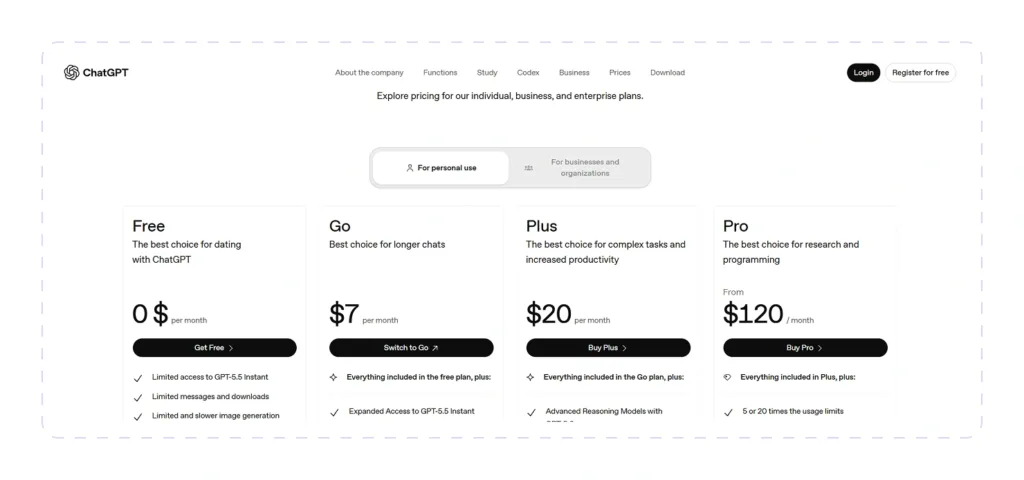
There is a free plan. Go starts at $7 per month, Plus at $20 per month, and Pro at $120 per month.
Business costs $20 per user each month with annual billing and includes ChatGPT and Codex. Enterprise pricing is custom.
Quillbot
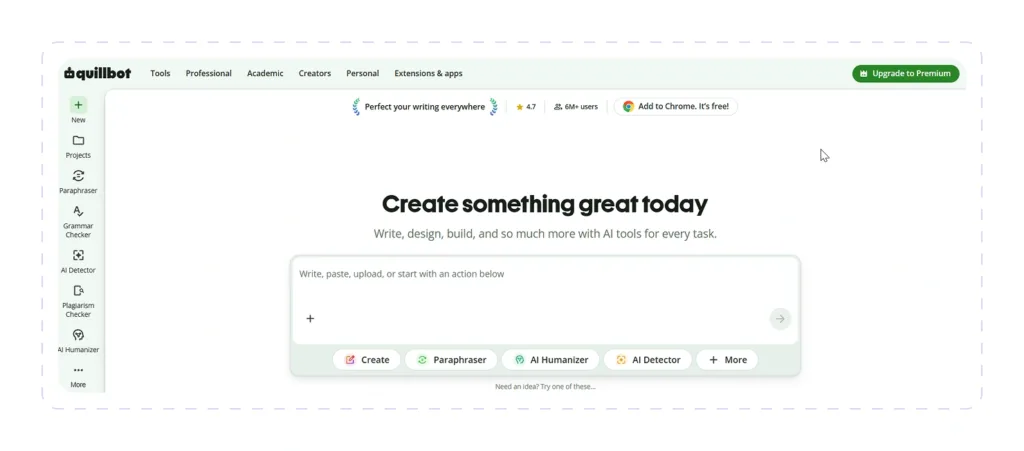
Quillbot began as a paraphrasing tool, and that DNA was destined to remain. It sees a reply less as a message to write and more as text to perfect.
There’s a dedicated AI response generator and the wider suite (paraphraser, grammar checker, and humanizer) behind it if you want to do some work on the first draft.
Best for:
Professionals, authors, and students who don’t require the response integrated into an outbound campaign or CRM and who want prompt, polished responses for routine messages.
Response Quality
Quillbot’s Response Generator creates a response in a matter of seconds when you provide it the incoming message along with a brief note about tone. It works better with a straightforward request rather than a jumbled back-and-forth since it is designed for one-time responses rather than interpreting the context of an entire thread. If the tone is awry, it affects the paraphrasing and fluency. Formal and creative styles are available for rewording to suit your needs.
Customization
Options like Standard, Fluency, Formal, and Creative allow you to lead a message in multiple ways, while the synonym slider changes word choice without a whole rewrite.
But remember that it’s only for improving sentences, not for changing how you respond in general. Other helpers remember your voice from one chat to the next, but this one doesn’t. This means that each reaction is a new start.
Security
Quillbot says it doesn’t sell your information, and logged-in users can choose not to have their text stored or for their inputs to be used to train its models.
However, third-party privacy reports have pointed out that its policy isn’t very clear about things like keeping periods and encryption standards. It’s not possible to train with Team Plan data.
Pros:
- Free tier is genuinely usable; no account required for basic replies
- Fast for quick, single-message replies
- Works inside Gmail, Outlook, Slack, LinkedIn, and other sites via the Chrome extension
Cons:
- Made for changing text you already have, not starting from scratch or keeping track of what’s going on in between threads.
- It’s a writing layer, not an automation tool, so it doesn’t work with CRM or workflow.
- Only works as an add-on for Chrome; doesn’t work on any other browsers besides Chromium-based ones like Edge
- Independent privacy reviews say that the policy isn’t clear about how long data is kept and how it is encrypted.
Integrations
The Chrome app works with Gmail, Outlook, LinkedIn, Slack, Notion, Confluence, and most other sites where you type. It also has an add-on for Google Docs and a connection for Microsoft Word.
Customer Feedback
Reviewers give Quillbot high marks for summarizing and writing, and the free version is praised for actually being useful and not just a sample. One common complaint is that it’s mostly an editing tool. People who want an assistant to write full replies from scratch or keep track of what’s going on in a conversation usually choose something else.
Pricing
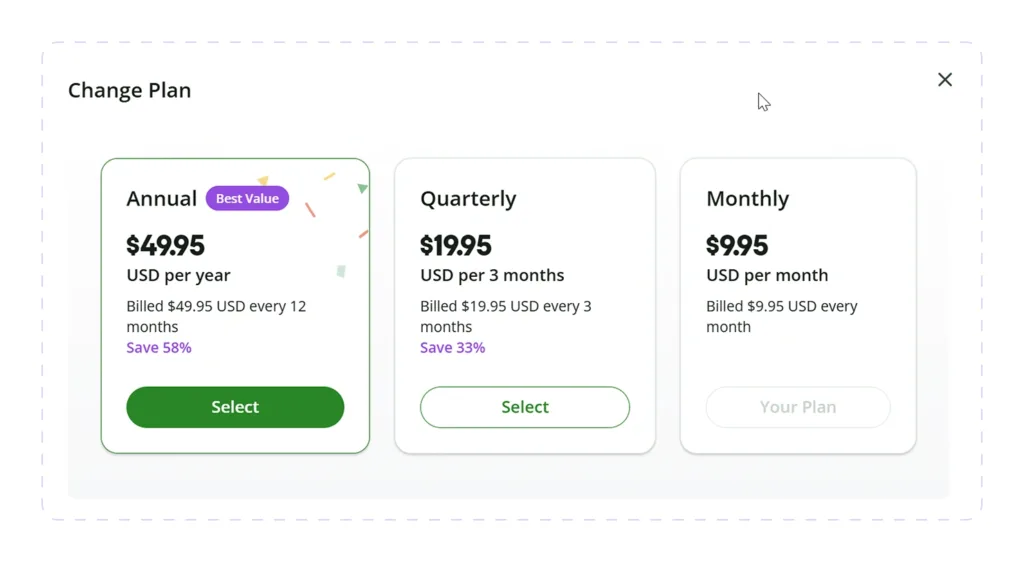
There is a free plan. Premium costs $9.95 a month, $19.95 every three months, or $49.95 a year if you pay for it all at once. The yearly plan saves you 58% compared to monthly billing, which costs $4.16 a month.
Claude
Originally, Claude is not an AI reply generator, but it’s become a go-to for people who want a conversation partner that can keep track of context, navigate subtleties, and write answers without the need for a dedicated tool.
Best for:
People who want context-aware responses to important messages (like a tough client email or a tough team talk) and don’t mind working in a chat window instead of an inbox tool.
Response Quality
Claude reads the whole context before writing; it’s usually good at spotting subtext (“per my last email” energy vs. an actual passive-aggressive dig) and changing the reply to fit.
This is helpful when you want a quick answer based on the right ideas instead of one based on wrong ones because it tends to ask a clarifying question when the ask is really unclear instead of guessing.
Customization
Simply by asking, you can change the sentence’s tone, length, and structure. The Styles feature in Claude lets you save a voice that you like (short, formal, or casual), and then it will use that voice automatically when you talk, so you don’t have to explain your choices all over again.
Things you use over and over, like brand voice, a person’s contact history, or old files, can be saved in projects so that answers don’t have to start from scratch every time.
Security
Claude doesn’t default to using chats from user plans to train its models. Business plans (Team, Enterprise) provide additional control over data and options for how long it is retained.
There’s no free version with advertisements, and Claude doesn’t share user data with marketers.
Pros:
- Smart enough to read more than just the last message in a thread and understand what it all means.
- Projects and Styles keep you from having to give the same directions over and over again
- It works well with long papers and messy source material like files and photos
- There are no ads, and by default, data is not used for training
Cons:
- No single inbox, no send-from-here workflow
- Copy-paste is still part of the workflow unless you’re doing it using a connection or extension
- Free tier usage limitations are more stringent than some competitors
Integrations
You can connect Claude to Gmail, Google Calendar, and Google Drive. You can also use Claude in Chrome to do things on your computer. It also has MCP connectors that let it plug into outside tools like Slack, Notion, and others.
Pricing
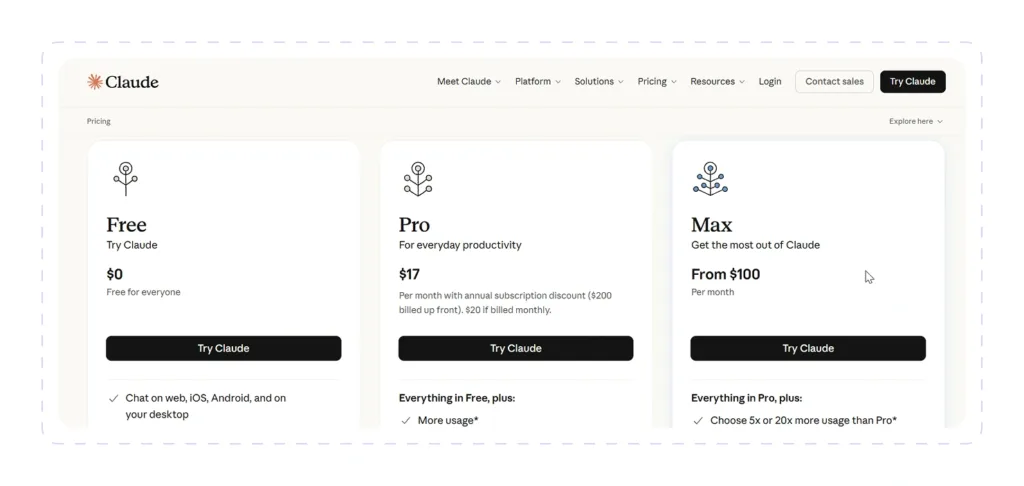
Free plan available. Pro costs $20/month, or $17/month with annual billing ($200 upfront). Max starts at $100/month.
There is a 5-seat minimum for team plans that start at $20-25 per seat per month, paid yearly. Pricing for businesses is unique.
DeepAI
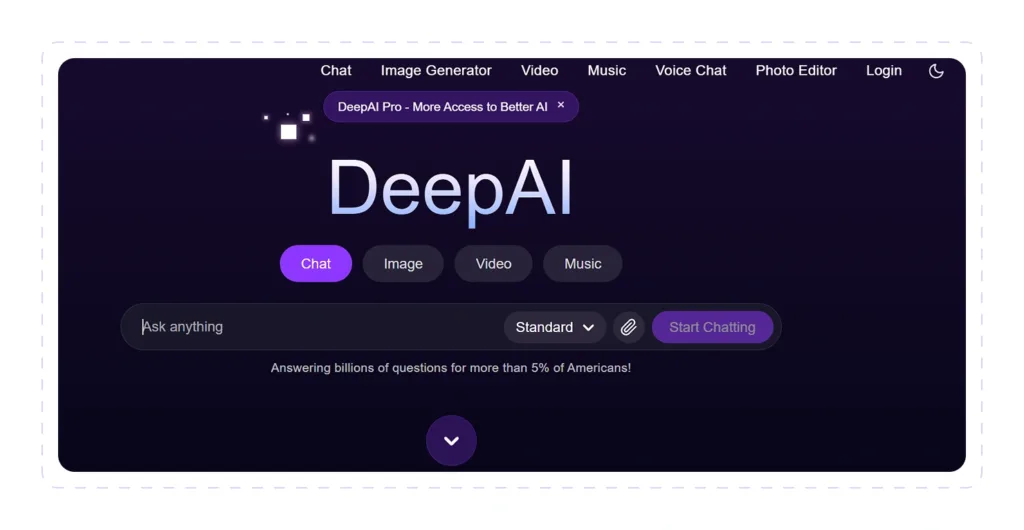
DeepAI kicked off as a browser-based picture generator but has now added AI chat, video, music, and an AI text reply generator.
The latter isn’t really their major specialty, but anyone already using its core features can benefit from the chat tool whenever needed.
Best for:
Casual users who want an all-in-one AI playground (chat with picture, video, and audio capabilities) rather than a specific reply or writing assistance.
Response Quality
DeepAI’s chat can manage simple back-and-forth and generate a reply if you explain the issue. However, reviewers often notice the text output feels antiquated and generic compared to specialist tools.
Overall, it’s decent for a rough first run, but it’s less dependable for anything nuanced. On the bright side, Genius Mode can provide in-depth responses at the expense of a longer wait, but again, it’s just an extra feature rather than real research. Still, there is no clear evidence that it reads an entire thread as a specialized assistant does.
Customization
There is very little personalization. You may qualify DeepAI as a generic chatbot, not a reply process; you can tweak the tone and subject through the prompt, and Genius Mode will make replies more detailed if you ask.
However, there is no saved-style feature, no brand-voice memory, and no mode that is tailored to message or reply writing.
Security
In contrast to its larger competitors, DeepAI does not require an account for basic use, which reduces data tied to a particular identity.
However, the company’s privacy practices are poorly documented, with third-party security reviews noting that DeepAI falls below industry benchmarks on data-leak risk and does not publish the kind of detailed security or compliance information that enterprise-grade tools do.
If you’re not using it for anything sensitive or client-facing, it’s OK to utilize it casually.
Pros:
- You can use simple chat and writing tools without having to sign up
- Honestly cheap for a package that comes with music, video, chat, and pictures
- API access is cheap for developers who want to add generation to their apps
Cons:
- The quality of text and chat is not nearly as good as that of writing or replying tools
- It doesn’t handle thread context, save styles, or have reply-specific features
Integrations
DeepAI does not have direct connections to inboxes, CRMs, or chat services. Its main draw is a REST API (Python, JavaScript, Ruby, and others) that covers text production, image editing, and associated features.
In this sense, yes, it would be great to integrate DeepAI into your product, but not to connect to where your interactions currently occur.
Customer Feedback
The price-to-feature ratio of the bundle, which includes chat, image, video, and music tools, has routinely received favorable feedback from reviewers.
But the recurring issue is that nothing in the suite, including the chat/text capabilities, is best-in-class; it’s a generic, low-cost alternative rather than one designed for professional or response-specific use.
Pricing
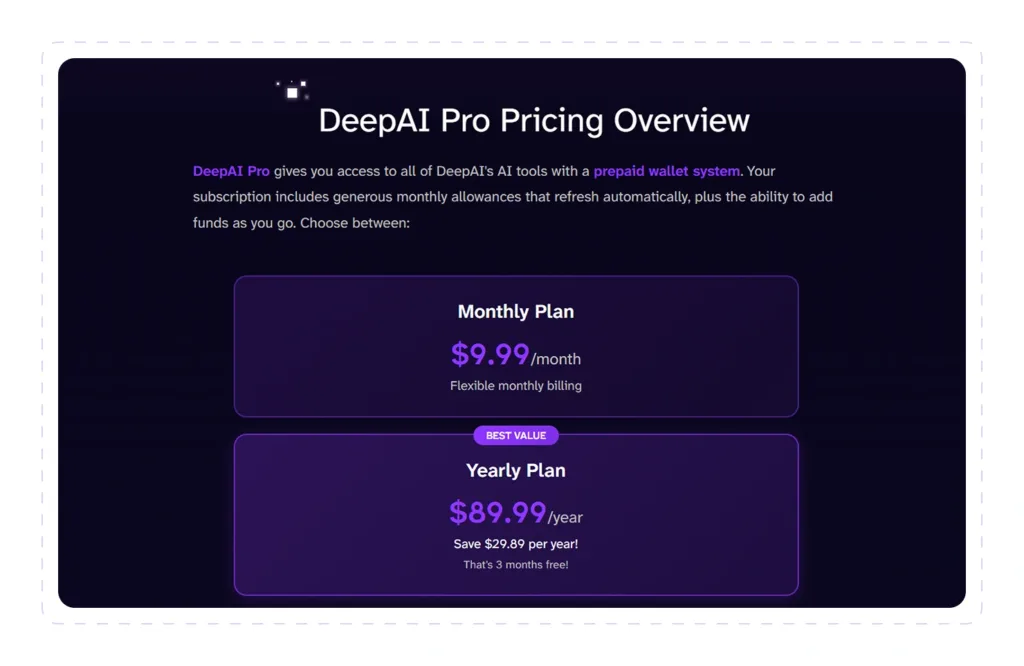
DeepAI Pro is based on a prepaid wallet system that provides significant monthly allowances that refresh automatically, as well as the ability to add funds as needed.
Monthly billing is $9.99/month, or $89.99/year on the yearly plan, for a savings of $29.89/year and three months free.
Jasper AI
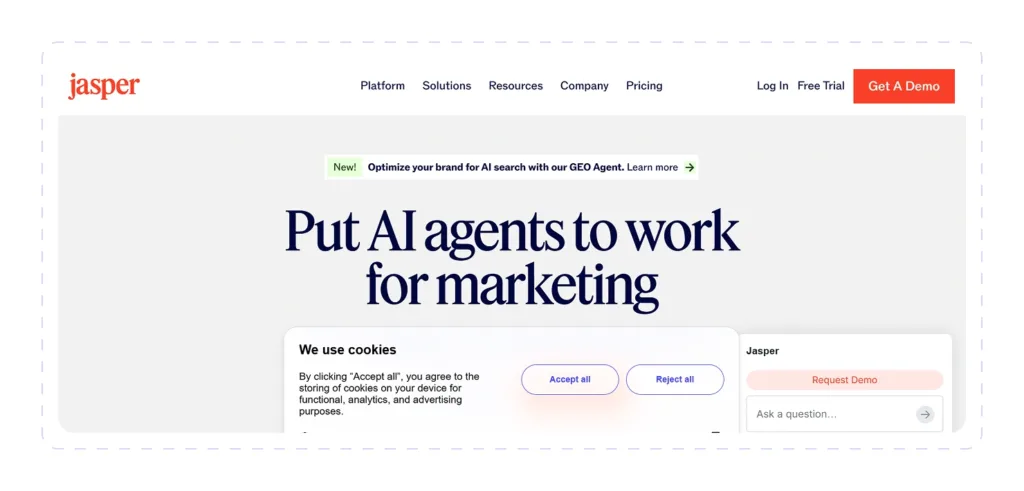
Jasper made its name based on marketing materials such as blog posts, ads, and email campaigns.
As of now, it additionally integrates an AI discussion reply generator, Jasper Chat, but doesn’t consider the new chat assistant a separate product.
Best for:
Marketing teams and content makers that require on-brand answers and copy at scale and want brand voice and campaign context built into every output rather than explained again.
Response Quality
Instead of seeming like a generic assistant, Jasper Chat’s responses will sound like your brand thanks to its knowledge base, which includes information about your company, tone rules, and products. This sets it apart from other conversational draughters.
The emotional side of a personal thread isn’t its strong suit; it was designed more for marketing and customer-facing writing.
Customization
Customization is where Jasper leans hardest. Brand Voice profiles, a Knowledge base you can feed with company and product context, and Campaign workflows that turn one brief into a full set of on-brand assets. It’s built around repeatable, on-brand output rather than one-off casual replies.
Security
Business tier plans offer SOC 2 compliance, single sign-on, and role-based permissions designed for teams in regulated sectors working with sensitive data.
The lower levels do not have the same corporate controls; therefore, your security scales with the plan you’re on and is not uniform across all levels.
Pros:
- Brand Voice and Knowledge base ensure messages are consistent across the whole team
- Unlimited word production on premium plans, no worries about credit limits
- Browser extension works inside Gmail, Google Docs, LinkedIn, HubSpot, and more
Cons:
- Priced per seat, so it becomes expensive quickly for teams.
- Originally for marketing/brand content; not ideal for personal or casual one-off responses
- The entry plan does not include business-tier security features
Integrations
The Chrome extension lets you write with Jasper inside Gmail, Google Docs, LinkedIn, web applications like HubSpot, WordPress, and others without having to switch tabs. The business plan includes a more robust API and integration with customer relationship management and marketing platforms.
Customer Feedback
Reviewers repeatedly call Jasper the top choice for teams who want consistent, on-brand output at scale, with particular kudos for Brand Voice and Campaign mode.
The main gripe is how much more expensive it is in comparison to general-purpose assistants like ChatGPT or Claude. The premium is justified only when you utilize the brand/team features, and Jasper is marketed as a targeted marketing tool instead of an affordable all-purpose one.
Pricing
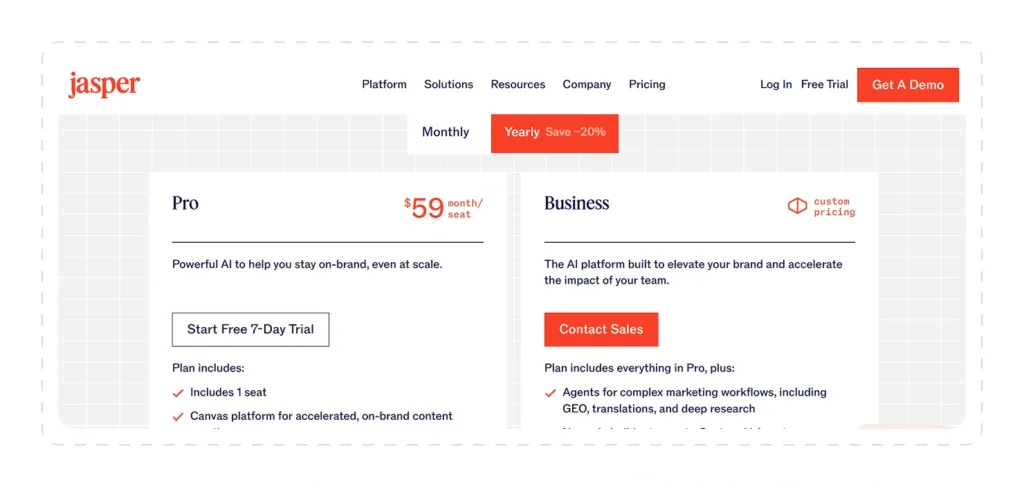
Jasper offers two different plans: Business and Pro. If you pay annually, the price for Pro is $59 per seat. It comes with a free 7-day trial and one seat. Business plan comes at a custom price.
Toolsaday

With more than 40 tools covering email, stories, blogs, ad copy, and more, Toolsaday is a comprehensive AI writing package that also includes an Email Generator and Response Generator designed especially for responding.
Best for:
Those looking for a reply-focused tool rather than a budget-friendly, all-in-one writing kit that also generates replies.
Response Quality
The Email Generator has a special mode for “reply to email”: you paste the message you received, tell it what you want to do (e.g., “confirm the meeting”), and it will write around that context.
Toolsaday delivers queries through a stack of named models (Cheetah, Liger, and Butterfly for speed; Puma and Jaguar for deeper reasoning and creativity), which means that a quick answer generated on a lower tier is notably thinner than one generated on the higher-end plans.
Customization
You can define the type of message (compose new vs. reply), purpose or response goal, subject line, recipient, sender, a tone selector, length (50-500 words via slider), format (plain text or HTML), and language.
That’s a good deal of structured control for a reply-specific tool. Additionally, you can upload files and images for context, but such functionality is gated to Pro, Ultra, and Max plans.
Security
Toolsaday says it doesn’t utilize consumer data to train its artificial intelligence systems, doesn’t sell or share personal information with third parties, and only keeps data as long as needed (erased content is defined as destroyed).
Furthermore, content created by users is kept confidential, and no user-specific data is stored for the email tool in particular.
Pros:
- Reply-specific mode with structured fields (goal, recipient, tone, length) instead of a blank prompt box
- 40+ writing tools in one subscription, including email/reply generation
Cons:
- Best model tiers (Puma, Jaguar) are usage-capped even on paid plans; unlimited only at the top Max tier
- File/image context upload restricted to Pro and above
- Not quite as specialized as dedicated reply tools; it’s a generalist suite that just happens to be good at replies
- Security claims are self-published, without visible third-party certification
Integrations
Without mentioning inbox, customer relationship management, or browser extension integrations, Toolsaday is a web platform that operates independently. This is not a tool that is housed within Gmail or Outlook; rather, it is a destination tool that you copy from.
Customer Feedback:
Toolsaday lists more than 700,000 users and testimonials that praise the email generator for increasing the number of responses to outreach emails and helping people who don’t speak English as their first language improve their business writing.
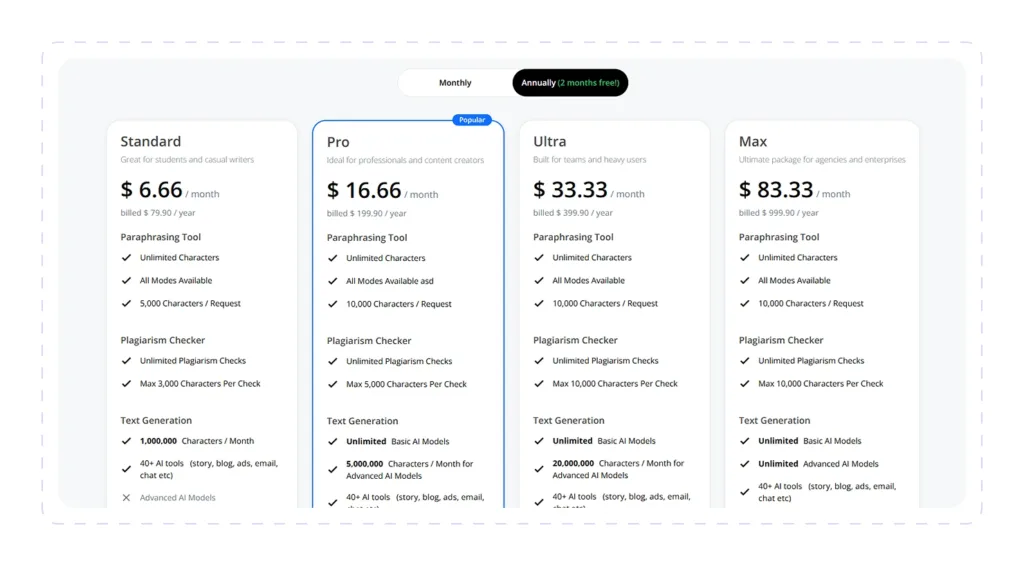
Pricing
- Standard: $6.66/month billed annually for 1,000,000 characters/month, 40+ tools, no advanced AI models.
- Pro: $16.66/month billed annually ($199.90/year) with unlimited generations on the base model and 5,000,000 characters per month on the premium models.
- Ultra: $33.33/month (billed annually) for 20,000,000 characters/month on advanced models, designed for teams.
- Max: $83.33/month, billed annually for unlimited generation on both basic and advanced models.
Annual billing works out to two months free compared to paying monthly. No free trial, but a free version with core functionality is available.
How to Choose the Best AI Reply Generator Tool
Start with the destination. If you answer ten unrelated messages a week, a general assistant or focused generator may be enough.
If a sales or support team handles hundreds of conversations, prioritize native channels, shared context, permissions, automation, and human handoff.
Features to Look For
- Context over cleverness: your AI message reply generator should know the incoming message, past interaction, receiver, and intended next step. Tone buttons can’t make up for lack of context.
- Final response control: search for tone, length, language, purpose, brand voice, and “must include/must avoid” restrictions. The greatest tools are quicker at editing, not just generating.
- Top accuracy: customers and salespeople should get accurate answers from a knowledge source, a CRM, or accepted product data. A smoothly flowing illusion is still a bad answer.
Common Buying Mistakes
- Not separating good writing from correct facts: a natural tone does not imply that a price, policy, deadline, or product detail is correct. Use reliable sources and check claims that are based on facts.
- Trusting one demo trial: run at least real messages for each tool on your shortlist: easy, vague, emotive, extremely technical, multilingual, and fact-dependent. Count how many drafts you would actually send after one revision.
Why Teams Choose Dripify for AI-Powered Replies
Most AI reply generators address the blank page problem. Dripify solves the reply workflow.
Response in B2B outreach is rarely a standalone piece of copy. It depends on who the lead is, what was happening on LinkedIn, whether they accepted a connection, what message they received, and when the next follow-up should stop.
Dripify keeps that context connected. Teams can personalize LinkedIn messages and emails with 20+ variables, add AI-generated icebreakers, build conditional multichannel sequences, and manage incoming replies from one dedicated inbox. When a lead answers, reply detection pauses the sequence so automation does not keep talking over a real conversation.
A general AI message reply generator can help write the sentence. Dripify connects that sentence to the prospect, channel, timing, follow-up logic, and sales workflow.
Start a 7-day free trial of Dripify and turn personalized replies into booked meetings.
AI Response Generators FAQ
Depends on your needs. If you need one-off messaging flexibility, consider an AI text reply generator with conversation context and iterative editing. Use a rewriting tool to refine the material you have previously written.
When you’re in sales or hiring, it makes more sense to look at tools that are more like the talk itself. You can expect lead data, personalized replies, follow-ups that are done automatically, and an inbox where you can check things when you need to.
If you talk to many people through SMS or customer service, an AI discussion reply generator that is designed to work with that platform will save you more time than one that can do many different things.
Some can, but a lot of them can only write rough drafts. A stand-alone AI email reply generator will usually write you a response that you can read and copy and paste into an email.
Inbox and automation platforms can generate suggestions inside a live conversation, trigger follow-ups, route messages, or send routine answers automatically.
Set up trusted sources of information, confidence levels, stop conditions, and escalation rules before you turn on auto-send.
Give a typical example of how you write, the context, and the background information. Tell them what not to do, like using useless words, being too excited, long openings, dashes, or repeating ideas the sender already included.
Have them come up with two or three short ideas, and then edit the best one. Usually, adding a small personal detail or a clear next step makes a statement sound more real than using slang.
A tool that connects lead generation to prospect context, multichannel follow-ups, reply detection, and lead management is the best choice for sales outreach.
If LinkedIn and email are both in your focus, Dripify is an excellent fit. One cloud-based process includes AI-assisted customization, 20+ personalization variables, automatic follow-ups, and a dedicated reply mailbox.

![Best Chrome Extensions for LinkedIn Lead Generation 2026 [8 Lead-Hunting Picks Inside]](https://dripify.com/wp-content/uploads/2026/07/Best-Chrome-Extensions-for-Lead-Generation-on-LinkedIn-2026-1-png-1.avif)


Prospect and close deals at scale
Run your LinkedIn or email campaign today, see results in 48 hours.
Free 7-day trial included
Book a demo (for teams of 10+)
