Choose Dripify: if you need an all-in-one LinkedIn + Email automation platform with a strong focus on safety, team collaboration, and scalability.
Choose Dux-Soup: if your outbound strategy relies on a single prospecting channel and you don’t need multichannel outreach.
Choosing between Dux-Soup and Dripify?
Both automate prospecting, but they’re built for different types of outbound.
Dripify is a cloud-only sales engagement platform that brings native LinkedIn and email outreach, prospecting, email discovery and verification, analytics, and team management into a single workflow.
Dux-Soup is available as either a Chrome extension or a cloud-based platform, depending on the plan. It’s designed for users who want a simple automation solution for repetitive prospecting tasks and CRM synchronization, without the complexity of a full sales engagement platform.
Dux-Soup vs Dripify: Feature Comparison at a Glance
Leads pause automatically across all campaigns as soon as an email reply is detected
Resume Paused Leads
Manual Lead Actions from Inbox
Shared Campaigns
Team plans
Shared Templates
Templates can now be assigned per-team (e.g., different templates for US vs. Europe teams)
Limited
Lead Assignment
Team Roles & Permissions
Basic Admin vs. Member distinction only, no granular permission tiers
Team Dashboard
Reports Per Team Member
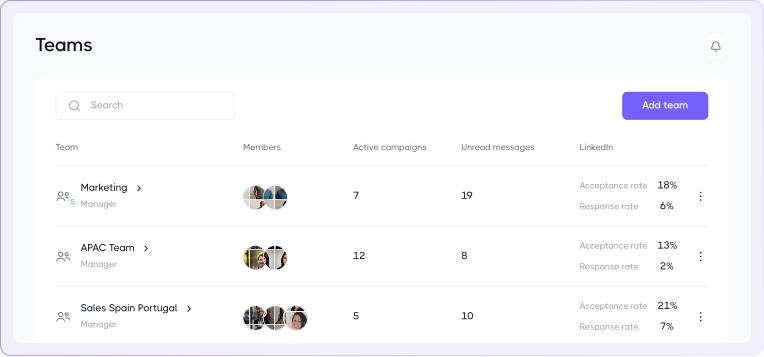
Tracks active campaigns, unread messages, and LinkedIn performance
Team Performance Comparison
Basic team stats only
Centralized Team Scaling Infrastructure
Cloud tier + Agency dashboard
Cross-Campaign Stats
Historical Campaign Reporting
Campaign-Specific Reporting
End-to-end funnel analytics across LinkedIn & email
LinkedIn only
Unified Recent Activity Stream
Activity log
Dedicated IP Address
LinkedIn Daily Limits
Manual Daily Limits Adjustment
Working Hours Scheduling
Cooling Down Feature
Dux-Soup’s equivalent is “Auto-Snooze”
Activity Control Center
Adaptive Activity Ramp-Up
Limits increase gradually based on account health
Functionally similar (Throttling tab + Auto-Snooze)
Automatic Safety Reductions
Manual/guided ramp-up on user’s own judgment
Human-Like Activity Simulation
Dux-Soup Overview
Dux-Soup positions itself as a prospecting automation solution designed to reduce manual work, simplify lead generation, and help sales professionals spend more time on meaningful conversations.
Dux-Soup Key Features
Support & Onboarding Resources
All Dux-Soup users have access to a range of support resources, including onboarding tutorials, community Facebook groups, live chat, webinars, and email support. Every user is also eligible for a complimentary 15-minute Support Call to get help with a specific question or issue.
Native Integrations
Dux-Soup connects natively to Slack, Microsoft Teams, HubSpot, Pipedrive, Salesforce, HighLevel, SharpSpring, and Freshsales, plus Zapier and Make for broader automation — without requiring third-party connector fees for the core CRMs.
Safety Controls
Dux-Soup offers a set of built-in safety controls that help users manage automation more carefully. Features include Auto-Snooze, which temporarily pauses activity before LinkedIn limits are reached, configurable daily activity limits, and a working hours planner that schedules actions within specified time windows.
What are the Pros of Dux-Soup?
Native integrations with CRM and sales tools
Built-in safety controls
AI-powered campaigns
What are the Cons of Dux-Soup?
LinkedIn-first platform with limited native multichannel
Browser-based automation requires the Chrome extension
Cloud automation is only available on the Cloud plan
AI personalization requires higher-tier plans
No native email outreach
Email discovery is credit-based
Dux-Soup Pricing
(billed annually)
14 days free access to the Turbo Plan with no credit card needed
Pro Dux
(for individuals)
$11.25
per month
Turbo Dux
(for individuals)
$41.25
per month
Cloud Dux
(for individuals)
$74.17
per month
Turbo Team
$41.25
per month
Cloud Team
$74.17
per month
Cloud Agency
$371
per month (monthly billing)
Dripify Overview
Dripify positions itself as an all-in-one LinkedIn sales automation platform with a strong focus on LinkedIn prospecting and email outreach
Dripify combines email discovery and verification in one native platform — no extra tools, complex integrations, or added subscriptions. Source leads from LinkedIn Search, Sales Navigator, Recruiter, Events, post engagement, connections, or CSV files, then add them directly to automated LinkedIn + email campaigns.
Smart limits, human-like pacing, randomized delays, and working hours keep outreach natural, while adaptive controls help protect your LinkedIn account. With fewer manual steps between sourcing and engagement, teams launch campaigns faster, manage outreach efficiently, and turn more prospects into conversations.
Dripify Key Features
Unified LinkedIn & Email Outreach Flows
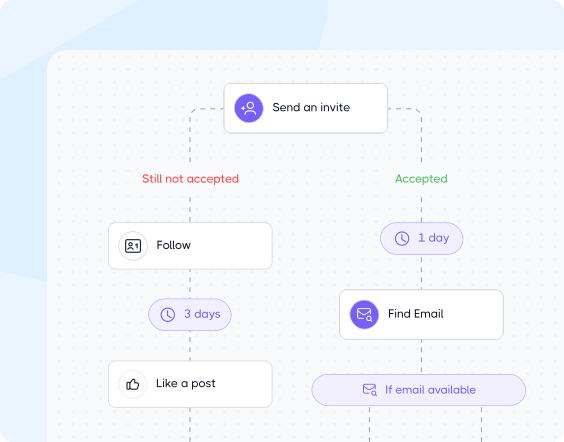
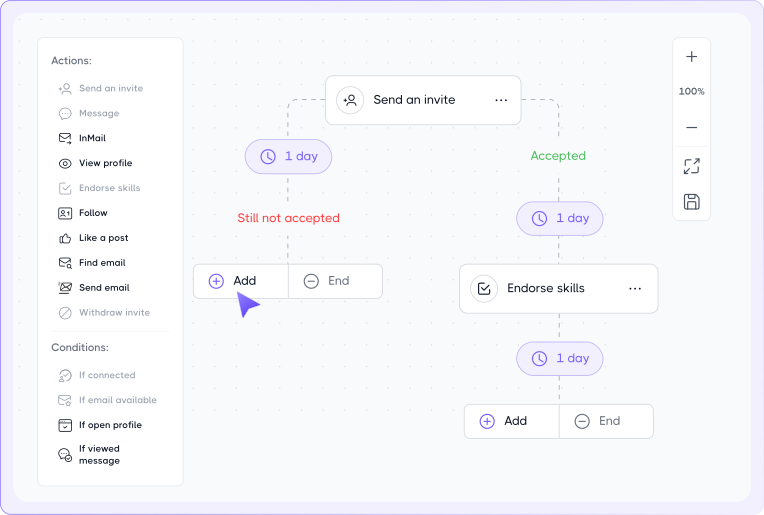
Dripify combines LinkedIn and email touchpoints in a unified sequence, making prospect nurturing more flexible than traditional LinkedIn-centric outreach flows.
Email acts as the opener, follow-up layer, or final conversion push, while automated LinkedIn workflows adapt the rest of the conversation around prospect behavior.
Previously, sequences paused only after a LinkedIn reply. Now, leads also pause instantly when an email reply is detected, with an in-app notification linking directly to the conversation.
Built-In Email Search & Verification
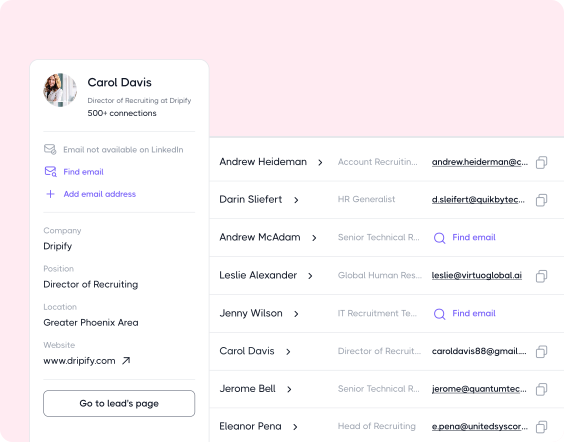
While many LinkedIn automation tools rely on external enrichment platforms, Dripify includes native email discovery and verification directly inside its outreach sequences.
Users can:
Find corporate emails beyond LinkedIn
Instantly verify email accuracy
Monitor deliverability
Automate cold email campaigns without leaving the platform
Behavioral Outreach & Personalization
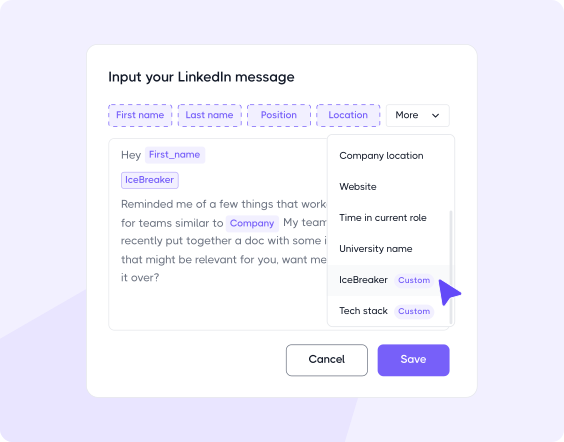
Dripify combines 20+ personalization variables with advanced automation, including behavior-based branching, smart delays, dynamic prospect journeys that adapt to engagement signals, and 18+ ready-to-use outreach templates.
Real-Time Campaign Editing
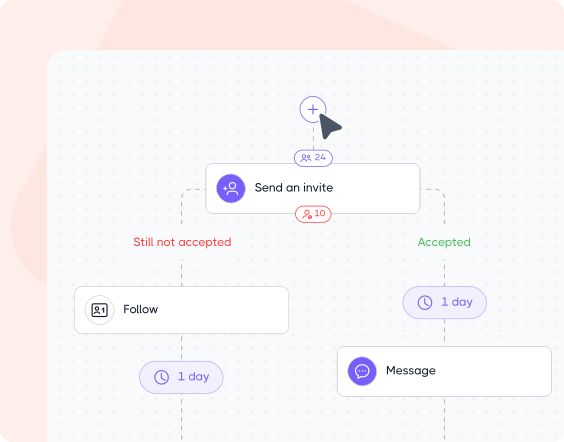
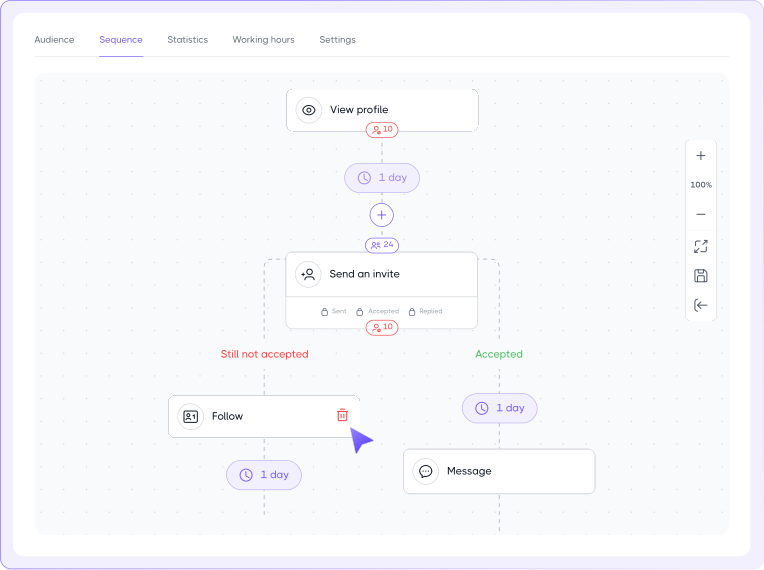
Dripify lets you edit active and paused campaigns without rebuilding them: add new actions at the start or between existing steps, adjust delays and message text, and re-engage leads who’ve already completed the sequence.
Now users can delete simple actions from live campaigns too.
Account Safety Infrastructure
Key safety features:
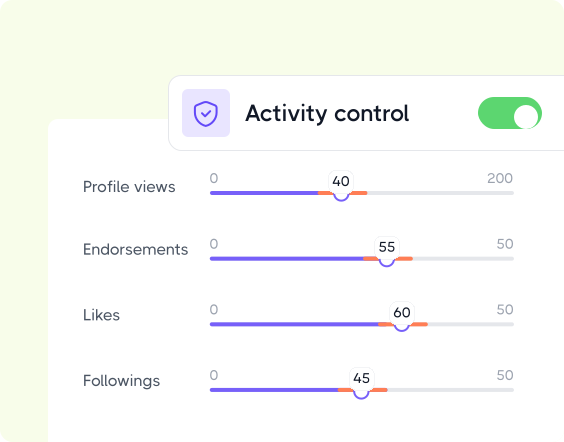
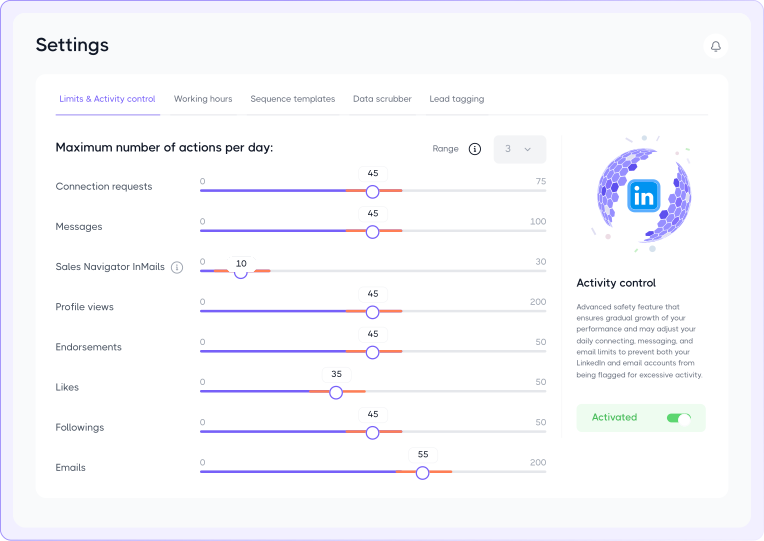
Activity Control – automatically optimizes daily outreach limits around account health, pending invites, activity history, and performance signals.
Working Hours – runs actions only during selected time windows for more realistic activity behavior.
Cooling-Down – detects risky activity spikes or repeated failed actions and temporarily pauses automation to help prevent LinkedIn restrictions.
Multi-Account Team Management
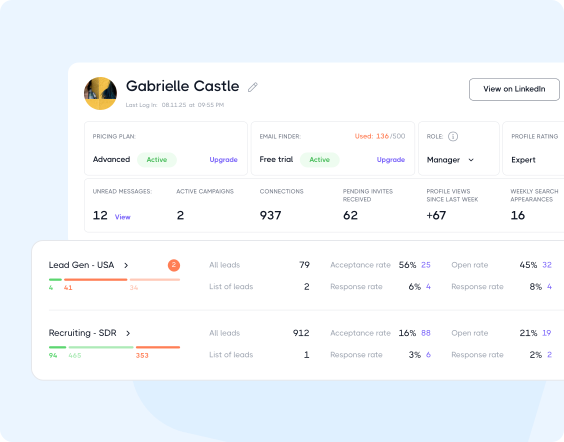
Monitor team performance in real time with per-member/ team-level stats
Assign leads & manage ownership across SDRs, recruiters, and account managers
Control access with roles & permissions
Collaborate without duplicate outreach
Organize teams by region, department, or client (ideal for agencies)
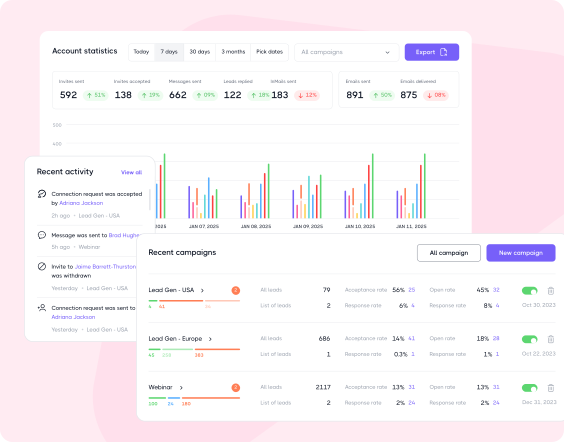
Live Campaign & Performance Insights
Measure outreach performance through:
Action-level analytics
Reply, acceptance, and engagement metrics
Campaign-wide performance dashboards
Unified reporting across LinkedIn, email, campaigns, and accounts
What are the Pros of Dripify?
Native LinkedIn & Email outreach inside one sequence
Built-in Email Finder & verification tools
Solid team collaboration and agency support
Centralized lead management & performance analytics
Workflow branching and behavior-based automation
Flexible live campaign editing
Strong account safety infrastructure with adaptive scaling
Beginner-friendly interface with minimal onboarding friction
What are the Cons of Dripify?
Cloud-only deployment
Best value is achieved when using both LinkedIn and email
Relies on personalization variables rather than AI writing
Dripify Pricing
(per user/month, billed annually)
One Minute Setup
7-Day Free Trial
No Credit Card Required
Basic
$39
per month
Pro
$59
per month
Advanced
$79
per month
Enterprise
custom price
Dux-Soup vs Dripify: Head-to-Head Breakdown
Now you’re probably wondering: what actually makes Dripify stand out from Dux-Soup where it matters most? Let’s break it down.
Dux-Soup‘s LinkedIn campaigns follow a fixed, linear flow. They don’t support outreach sequence conditions or action branching, so there’s no way to route prospects based on actions like replying, accepting a connection request, or having an email found.
Dripify takes a more flexible approach with outreach sequence conditions and multi-path branching, allowing a single campaign to adapt automatically to each prospect’s behavior.
Campaign Flexibility
Dux-Soup offers no live campaign editing. Once a sequence launches, adjustments generally mean rebuilding it.
Dripify lets you add new steps at the beginning or anywhere within an existing live or paused sequence. Additionally, you can delete simple actions (like View Profile, Follow, or Endorse Skills) from the sequence flow too.
When you do so, affected leads automatically continue to the next one, so your campaign keeps running without losing prospects.
Lead Sourcing & List Management
Dux-Soup’s lead sourcing is limited to LinkedIn Search, Sales Navigator, Recruiter, and CSV import only. Similarly, segmentation relies on basic tags, while lead filtering is largely limited to LinkedIn’s native search rather than advanced built-in filters.
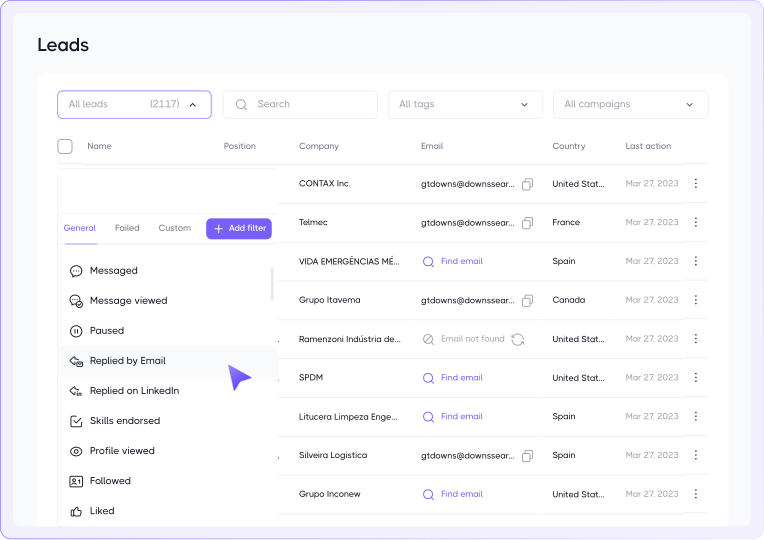
Dripify imports leads from a wider range of sources, including LinkedIn Search, Sales Navigator, Recruiter, Events, Groups, My Network, CSV files, post engagement, and individual profile URLs. It complements these sources with advanced tagging, reusable lead pools, a built-in lead filtering system, and unrestricted lead exports.
Segmentation now extends to reply channels, allowing you to filter leads based on whether they responded via email or LinkedIn.
Account Safety
Dux-Soup’s connection request scaling is manual. Users adjust limits themselves rather than an algorithm reacting to account health, and it operates through your own LinkedIn session (browser or connected cloud session) instead of a dedicated, isolated IP.
There’s also no automatic safety reduction if risk signals appear; the Throttling tab and Auto-Snooze cover daily limits and pausing, but the ramp-up itself is guided by the user’s own judgment.
Dripify pairs dedicated IP addresses with an Activity Control system that automatically adjusts daily outreach limits around account health, pending invites, activity history, and performance signals. It’s a self-correcting system rather than one that depends on the user getting the settings right.
Team & Agency Structure
Dux-Soup’s Team and Agency plans use a flat workspace structure with a basic Admin vs. Member role model and no granular permission levels.
Dripify, by contrast, supports a true multi-team architecture. Accounts are no longer limited to a single team, allowing agencies and larger organizations to organize work by region, department, or client. Each team has its own dashboard, sequence templates, and cross-member “Skip Found Leads” deduplication.
Access is also team-scoped. Team members can only view their own team’s data, while managers and owners get a consolidated view to compare performance across teams and drill down into individual member metrics.
Deployment & Onboarding
Independent reviews often describe Dux-Soup‘s interface as dated and less intuitive than newer sales engagement platforms.
Getting started also involves installing and configuring a Chrome extension. Even the Cloud plan still requires the extension for setup, only removing the need to keep your browser running afterward, which can add friction for first-time users.
Dripify is cloud-native from the start. There’s nothing to install. Simply sign in and begin building campaigns. Outreach, lead management, messaging, and analytics all live in a single workspace, making onboarding faster and everyday use smoother.
When Dux-Soup Might Be a Better Fit
If sourcing occasionally
When LinkedIn outreach isn’t a full-time function (no dedicated pipeline, no team to coordinate), a single-purpose tool like Dux-Soup is often enough to get the job done without extra overhead.
If you like DIY setups
For consultants, founders, and go-to-market professionals who’d rather configure things their own way than rely on an automated system making decisions for them, Dux-Soup’s more hands-on approach can be a good match.
If pre-sales or B2C
Early-stage founders still figuring out their sales motion, or anyone running outreach outside a traditional B2B pipeline, may not need more than Dux-Soup’s single-channel setup to get started.
Switching from Dux-Soup to Dripify
Moving from Dux-Soup to Dripify? Start with these simple steps!
Set Up Your Cloud Workspace
No Chrome extension to install; Dripify is cloud-native. Log in and connect your LinkedIn account, and you’re running without keeping a browser tab open.
Export and Re-Tag Your Leads
Pull your lists via CSV export. Remember, in Dux-Soup, 1st-degree contacts can be exported for free, but 2nd-degree+ contacts need paid credits, so budget in advance for that before you migrate.
Dux-Soup’s tagging was basic, so rebuild proper lead segments and reusable lead pools in Dripify rather than expecting a clean 1:1 import.
Rebuild Your Sequences & Add Email
Recreate your Dux-Soup LinkedIn actions (invites, views, follows, messages, InMail) in Dripify’s sequence builder, then layer in native email steps using the built-in email finder and verification to fill data gaps.
Add Branching Logic & Team Roles
Set up outreach sequence conditions (reply received, connection accepted, email found) so leads route automatically. Dux-Soup’s campaigns were linear, so this is new territory.
If you had a team on Dux-Soup’s basic admin/member setup, assign proper roles and lead ownership using Dripify’s more focused permissions.
If you’re setting up multiple client accounts or regions, consider creating separate teams in Dripify from the start, since templates and dashboards can now be scoped per team.
Start Slow on Activity Limits
Don’t copy over your old Dux-Soup daily volume. Set conservative starting limits and let Activity Control ramp up automatically based on account health.
What Dripify Users Say
Good… from the time-saving stand point. The way it is doing the work for me and alerts on new messages.
James O.
President, Staffing and Recruiting
This is the virtual assistant that you have been looking for! Dripify has a very intuitive UX/UI that guides you through the process of setting up campaigns and managing your leads. You don’t need a VA anymore to do these tasks!
Roderich Körner
Small-Business
A great way to slow-play some reach out to key contacts on LinkedIn. It’s automation, but recognizably human interactions.
Andy Hunt
SaaS & GenAI Growth Executive, x-UiPath
Dripify vs Dux-Soup FAQ
Neither platform is “better”; the right choice depends on your outbound strategy, workflow, and growth goals.
Dux-Soup is a good fit if your workflows already run through HubSpot, Pipedrive, or Salesforce and you want native, two-way CRM integrations without paying for a third-party connector such as Zapier.
Dripify is the stronger choice if you want LinkedIn + email in one workflow, sequence branching, live campaign editing, and adaptive safety controls, especially for teams and agencies.
Channel and architecture.
Dux-Soup is a LinkedIn-only tool, available as a Chrome extension (Pro/Turbo) or cloud platform (Cloud tier), with linear (non-branching) campaigns.
Dripify is cloud-only from the start and combines native LinkedIn &email outreach in a single sequence, with conditional branching, live campaign editing, and built-in email finding/verification (capabilities Dux-Soup doesn’t have).
Dux-Soup offers a lower starting price, with Pro beginning at $11.25/month, compared to Dripify Basic at $39/month (both billed annually).
The key difference is deployment. Every Dripify plan is fully cloud-based, including the entry-level Basic plan, so you get always-on automation from day one.
Overall, cloud deployment delivers more when it comes to always-on outreach. It removes browser dependency, reduces interruptions caused by device shutdowns, and makes campaigns easier to manage remotely.
Dux-Soup cloud automation is only available on the Cloudplan, which starts at $74.17/month (billed annually).
Bottom line: Dux-Soup is cheaper if you’re comfortable using the browser extension. But if you want cloud-native automation, Dripify delivers it on every plan, including its lowest-priced tier.
Yes. Moving from Dux-Soup to Dripify is easy and involves:
Exporting your existing lead lists from Dux-Soup
Importing your prospects into Dripify
Connecting your LinkedIn & email accounts.
Rebuilding your campaigns using Dripify’s unified LinkedIn + email workflows
*Since Dripify is cloud-based, there’s no browser extension to install or maintain, making the transition simpler.
Yes, a 14-day free trial with access to the Turbo plan; no credit card is required.
Both platforms prioritize account safety, but Dux-Soup relies more heavily on manual configuration.
Dripify combines manual controls with automated safeguards like Activity Control, automatic safety reductions, and Cooling-Down to help maintain safer outreach.
Whichever platform you choose, gradually ramping up activity remains essential.
Tell us the name of the software you wish to connect with Dripify and explain how exactly you intend to utilize this integration
Suggest an integration
Please fill the following fields to continue
Thanks a ton for suggesting your integration as the next one for us
We love that you took the initiative! We'll check it out and let you know the possibility to implement it in short term. Stay tuned for an update from us!
A/B test your message
Sign up here to be first in line when our exciting new feature rolls out
You’re on the list - stay tuned!
Awesome! Thanks for joining the waitlist! We'll reach out with an exclusive email when it's ready to launch. It might take a bit, but we promise to bring the news straight to you
Free 7-day trial. No credit card required. Cancel anytime
Select topics
Step 1/5
1235
Thanks a ton for requesting your custom masterclass!
Ready to dive in? We hear you loud and clear! Just give our sales team a tiny bit of time to personalize your quote, and we'll be in touch within 24 hours.